Choose the Right Aegisify Security Assessment for Your WordPress Environment
Compare Aegisify Audit WordPress security assessments by scan depth, required access, and the security questions each profile helps your team investigate. Start with the public attack surface, then add Agent-assisted code, vulnerability, application, authenticated, API, front-end, or compliance-oriented evidence when deeper review is appropriate.
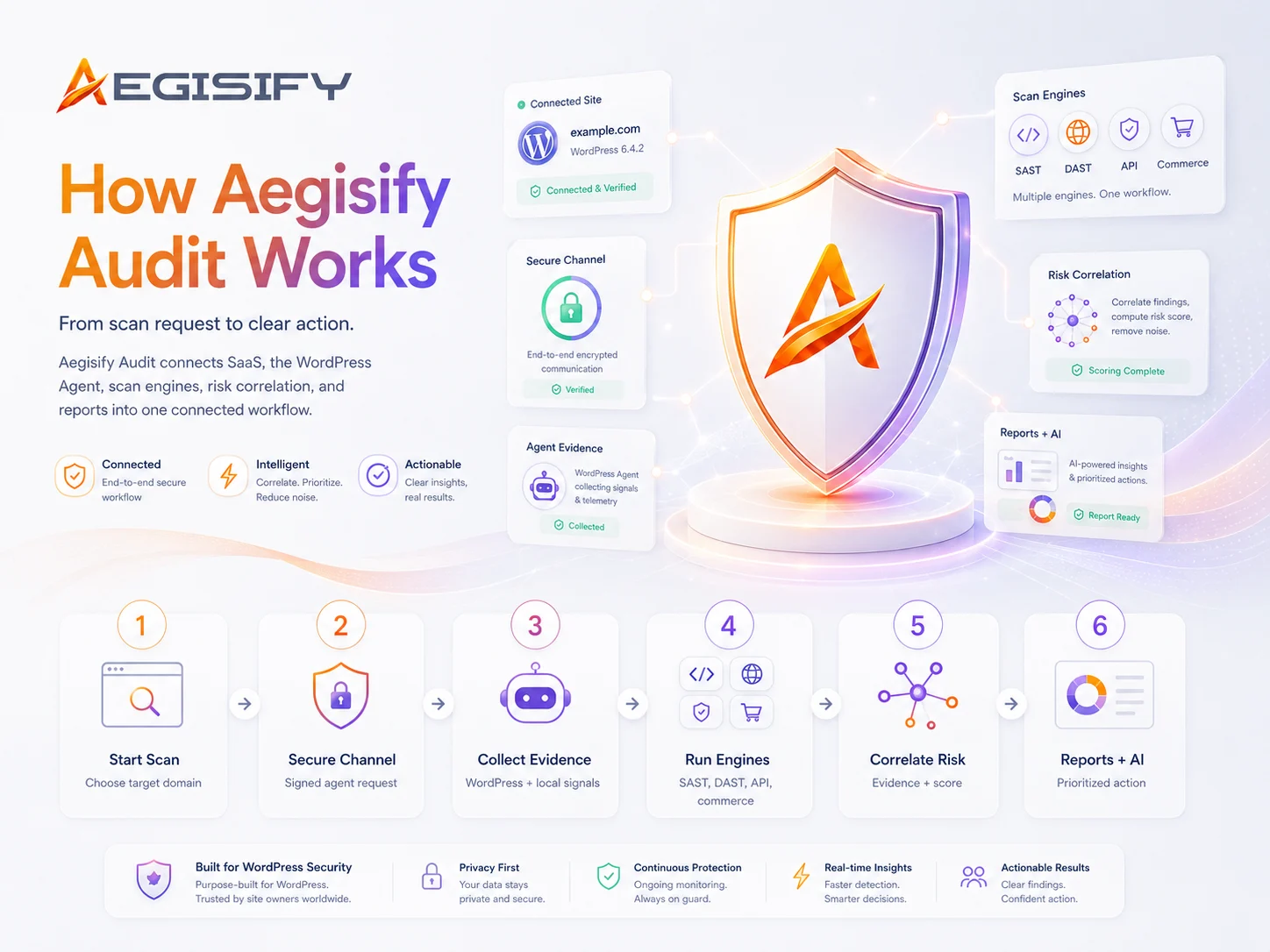
Aegisify Audit combines external application testing with authorized WordPress-side evidence so site owners, agencies, developers, and security teams can move from isolated scan results to a clearer, prioritized risk picture.
Match the Assessment to the Security Question
No single scan sees every layer of a WordPress application. Choose the profile that matches the surface, access level, and investigation depth your team needs.
Free Public External Security Scan
Start with 59 external checks across the publicly visible website, web application, APIs, headers, exposed artifacts, login surface, and session-related signals. This is the fastest baseline for understanding what an outside observer can see.
Vulnerability and Static Code Analysis
Use authorized WordPress evidence to review installed software, version and CVE context, dependency indicators, suspicious code patterns, file-level findings, permissions, and WordPress-specific control weaknesses.
Quick and Enterprise DAST
Evaluate how the running application responds across public routes, forms, parameters, headers, browser assets, and supported WordPress or WooCommerce workflows. Deeper profiles expand route coverage and application context.
Deep Authenticated DAST
Review protected paths, post-login behavior, role visibility, session handling, access-control signals, and privilege boundaries using approved credentials and configured authentication workflows.
API, Front-End, and Compliance-Oriented Review
Choose focused discovery for REST, GraphQL, OpenAPI, JavaScript-exposed endpoints, source maps, browser-side risk signals, or structured WordPress hardening and control-baseline checks.
What You Receive
Aegisify Audit organizes supported findings by severity, affected surface, evidence, rule or risk family, and recommended next action. Depending on the selected profile, the workflow can also include route inventories, vulnerability context, reproduction guidance, remediation recommendations, and retest or verification information.
The objective is not to create a longer alert list. It is to help your team understand what was observed, what deserves investigation, and which action should come first.

How can Aegisify AI help?
Ask about Aegisify or WordPress: errors, plugins, security, SEO, compatibility, troubleshooting, comparisons, or launch a free website scan.
Compare Aegisify Audit Security Coverage Across Eight Assessment Profiles
This Aegisify Audit security assessment matrix compares vulnerability scanning, WordPress static code analysis, dynamic application security testing, authenticated DAST, API testing, front-end analysis, and compliance-oriented review by the security coverage each profile is designed to provide.
Use the matrix to match the assessment to the question your team needs to answer: Is vulnerable software installed? Does custom WordPress code expose risky patterns? Can a public or authenticated workflow be abused? Are APIs, browser assets, commerce paths, or hardening controls creating material risk?
Focused Scan Profiles
Vulnerability
Commerce
Compliance
How to Read the Matrix
A checkmark identifies a primary coverage area for that profile. A cross means the capability is not a primary test objective for that profile. Scan depth still depends on authorization, configuration, reachable surfaces, available evidence, and the selected assessment settings.
Not a primary focus
On smaller screens, swipe horizontally to compare all eight scan profiles.
| Security Coverage Area | Code & Vulnerability | Dynamic Application & Commerce | Advanced Focused Assessments | |||||
|---|---|---|---|---|---|---|---|---|
| What the Assessment Investigates |
VS Vulnerability Scan Software, integrity, exposure |
SCA Static Code Analysis Code and control signals |
QD Quick DAST Fast public application review |
ED Enterprise DAST: App & Commerce Deeper routes and revenue paths |
DA Deep Auth DAST Post-login roles and sessions |
API API DAST REST, GraphQL, OpenAPI |
FE Front-End DAST Browser and client-side surface |
CMP Compliance Controls and hardening baseline |
| Critical Exploit and Abuse-Path Validation | ||||||||
|
Browser injection path review Surfaces reflected and client-side cross-site scripting paths that could turn a normal page into a session-abuse or account-compromise path. | Not a primary focus | Not a primary focus | Primary coverage | Primary coverage | Primary coverage | Not a primary focus | Primary coverage | Not a primary focus |
|
Database and server-side input abuse review Evaluates high-impact input-abuse patterns such as SQL injection, server-side request forgery, path traversal, and unsafe redirect behavior. | Not a primary focus | Not a primary focus | Primary coverage | Primary coverage | Primary coverage | Not a primary focus | Not a primary focus | Not a primary focus |
|
Privileged workflow and access-boundary review Tests whether sensitive actions, protected objects, administrative paths, and role boundaries are gated by appropriate authentication and authorization controls. | Not a primary focus | Not a primary focus | Primary coverage | Primary coverage | Primary coverage | Primary coverage | Not a primary focus | Not a primary focus |
| Surface Discovery and Application Visibility | ||||||||
|
Security header and exposure posture review Reviews internet-facing hardening signals, transport controls, headers, and visible exposure conditions that influence defensive posture. | Primary coverage | Primary coverage | Primary coverage | Primary coverage | Primary coverage | Primary coverage | Primary coverage | Primary coverage |
|
REST API and public route discovery Inventories exposed routes, namespaces, and endpoints so defenders can understand the public application and API surface. | Primary coverage | Primary coverage | Primary coverage | Primary coverage | Primary coverage | Primary coverage | Primary coverage | Primary coverage |
|
Browser DOM and client-side asset discovery Reveals JavaScript-heavy routes, browser assets, source-map clues, and client-side exposure that server-only discovery may miss. | Primary coverage | Primary coverage | Not a primary focus | Primary coverage | Primary coverage | Not a primary focus | Primary coverage | Not a primary focus |
|
Commerce checkout and order-integrity review Focuses on cart, checkout, customer account, coupon, payment, webhook, and order paths where revenue-impacting abuse may occur. | Not a primary focus | Not a primary focus | Not a primary focus | Primary coverage | Primary coverage | Primary coverage | Primary coverage | Not a primary focus |
| WordPress Software, Code, Integrity, and Compliance Assurance | ||||||||
|
Known vulnerable WordPress software matching Flags WordPress core, plugin, theme, and related software versions associated with known security exposure and remediation context. | Primary coverage | Primary coverage | Not a primary focus | Not a primary focus | Not a primary focus | Not a primary focus | Not a primary focus | Not a primary focus |
|
Integrity, malware, and administrative-drift review Highlights suspicious code signals, file drift, risky administrative changes, and integrity mismatches that may indicate compromise or weak governance. | Primary coverage | Primary coverage | Not a primary focus | Not a primary focus | Not a primary focus | Not a primary focus | Not a primary focus | Not a primary focus |
|
WordPress code and control assurance Identifies risky WordPress code paths, permission concerns, coding-standard signals, and control gaps that should be reviewed before release or audit. | Not a primary focus | Primary coverage | Not a primary focus | Not a primary focus | Not a primary focus | Not a primary focus | Not a primary focus | Primary coverage |
|
STIG/SRG-oriented hardening baseline Benchmarks selected WordPress controls against structured hardening expectations that may support higher-assurance and compliance-oriented environments. | Not a primary focus | Primary coverage | Not a primary focus | Not a primary focus | Not a primary focus | Not a primary focus | Not a primary focus | Primary coverage |
Start With Software and Code Evidence
Use vulnerability and static-code profiles when the main question involves installed WordPress software, known exposure, file integrity, custom code, dependencies, permissions, or hardening drift.
Use DAST for Running Application Risk
Use Quick or Enterprise DAST when the priority is public routes, input handling, browser behavior, application workflows, or WooCommerce paths that only become visible while the application is running.
Add Focused Depth When Context Matters
Use Deep Auth, API, Front-End, or Compliance profiles when saved roles, protected workflows, API inventories, browser-side assets, or structured control baselines are the primary investigation target.