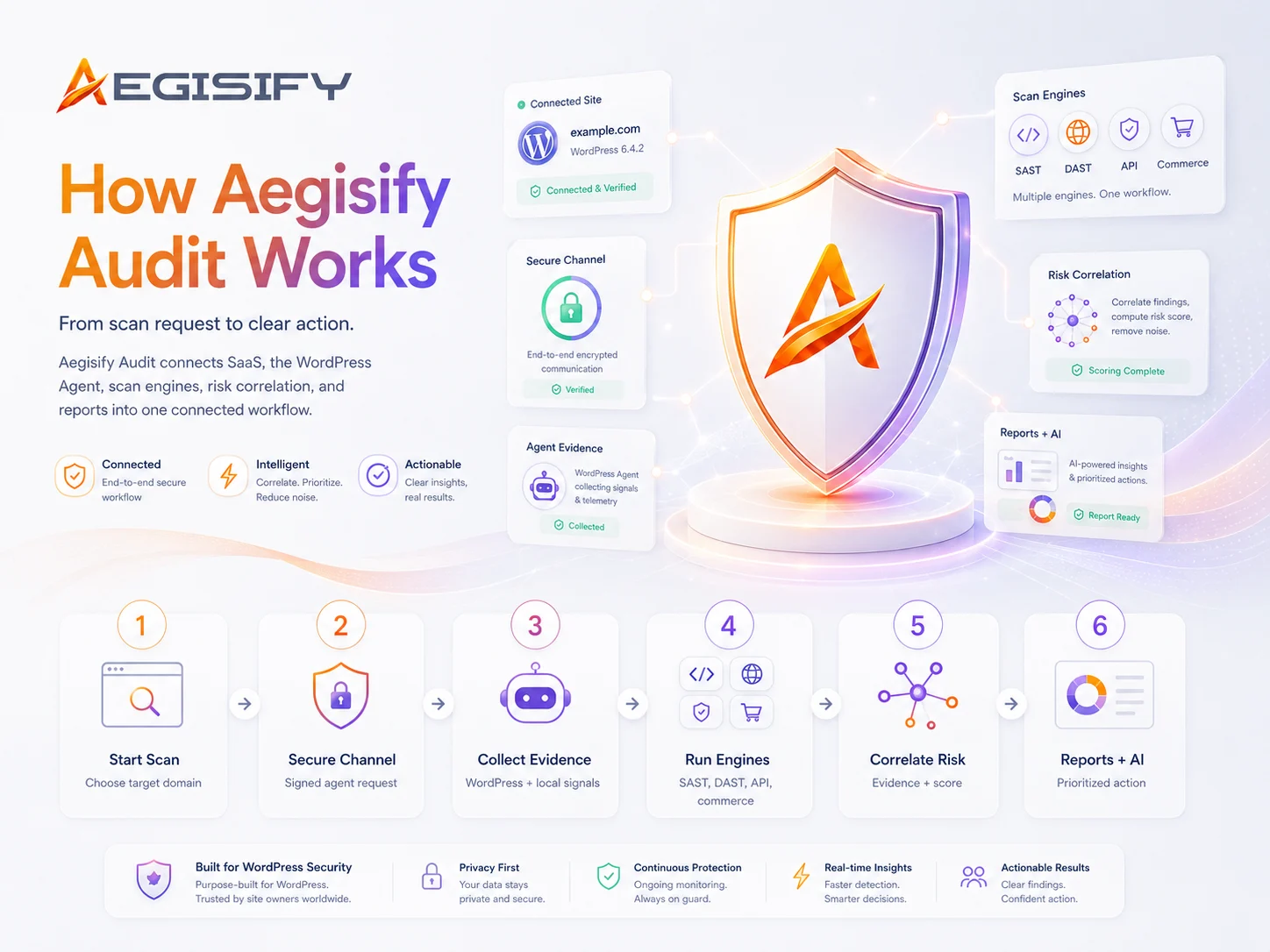
Do this first: Quick Start Setup Instructions for WordPress
1.)
After registration, login and setup your environment
Once you log in, navigate to Target Domain Settings and add your target domain.
Step 1: Download Agent
Step 2: Login to your WordPress Admin -> Plugins -> Add Plugins -> Upload Plugin -> select the downloaded agent
Step 3: Install and Activate
2.)
Add Domain, Add & Verify tXT record and Connect
Please note that deep security scanning requires the agent to be installed.
Step 1: Enter your domain and click “Add Domain”
Step 2: Add Domain below -> Create a txt DNS record with the details below -> click Verify Record
3.)
Expand Agent Details and Copy/Paste Encryption Key
The fun part begins once you are connected.
Step 1: Click to expand “Agent Details” below, copy the generated Encryption / Security Key
Step 2: Go back to WordPress Admin -> Open “Aegisify Audit Agent” from the left menu Open the Agent -> Paste the Encryption / Security Key
Step 3: Go to “Agent Details” below and click on “Connect Over SSL” and view the connectivity logs. It should say Success -> Agent Verified Succeeded.
Agent Setup Instructions for WordPress
1.)
Paste the encryption key
Once you log in, navigate to Target Domain Settings and add your target domain.
Step 1: Login to your WordPress Admin Panel -> Click on “Aegisify Audit Agent” on the left menu
Step 2: Paste the encryption key
Step 3: Go to Telemetry Access Control and allow access to SaaS
2.)
Run a “Scan Now”
Note: Scanning is only available when the agent successfully connects to the SaaS application.
Step 1: Select your Plugins
Step 2: Click “Scan Now” and the scan will run in the background.
Step 3: DONE! You are done, now head back to https://aegisify.com/secure-audit/dashboard/
The Main Menu is the primary navigation framework for the Aegisify Audit workspace. It gives the user structured access to executive dashboards, scan operations, domain administration, WordPress log ingestion, AI-assisted intelligence, and account configuration, ensuring that both operational workflows and governance tasks can be reached from a single control surface.

Select Domain
The Select Domain card sets the active scope for the dashboard and all related executive reporting. It ensures that metrics, AI summaries, findings, and account posture indicators are shown in the context of the selected verified asset rather than across unrelated targets.
Account & Security Dashboard
The Select Domain card sets the active scope for the dashboard and all related executive reporting. It ensures that metrics, AI summaries, findings, and account posture indicators are shown in the context of the selected verified asset rather than across unrelated targets.
Plan
The Plan indicator confirms the subscription tier governing feature access, reporting depth, and scan availability. It helps the user understand whether the current experience reflects the licensed operating model.
Analyze Now
The Analyze Now action refreshes the dashboard narrative and comparative reporting for the selected scope. It is the primary control used when the user wants the latest scan-derived interpretation surfaced immediately utilizing Artificial Intelligence.
Account Number
This card identifies the tenant boundary under which all dashboard data is being presented. It is important for governance and multi-tenant clarity because it confirms that metrics, findings, and reports are constrained to the correct organizational account.
Target Domain
This card confirms the active asset scope for the current executive view. It makes clear which domain the current posture, findings, and comparative insights are tied to, reducing ambiguity when multiple targets exist under the same account.
Current Overall Risk
This card presents the current risk state of the selected domain in a simplified executive form. It is intended to summarize the overall level of concern based on the latest completed scan results without requiring the user to interpret raw findings first.
Posture Score
This card provides a weighted security posture score for the selected scope. It offers an at-a-glance indicator of relative strength or deterioration, helping leaders and engineers gauge whether the environment is improving, stable, or regressing over time.
Critical + High Open
This card isolates the highest-priority open issues currently affecting the selected scope. It is designed to surface the clearest signal of present business and technical risk requiring immediate attention.
New Critical + High
This card shows whether new top-severity issues have been introduced since the prior comparable scan. It is intended to help teams distinguish between existing known risk and newly emerging exposure.
New Vulnerabilities
This card highlights newly surfaced known vulnerabilities in the latest scan cycle. It is particularly useful for understanding whether recent changes, component updates, or missed coverage have introduced fresh software risk.
Site Drift
This card summarizes whether the observed site composition has changed between scans. It is a concise indicator of environmental movement that may explain new findings, altered posture, or changed attack surface.
Compliance Findings
This card reports the count of current compliance-related observations within the selected scope. It is intended to quantify control and baseline deviation in a way that is immediately useful for governance and remediation planning.
Completed Scans
This card indicates how many completed scans are available for comparison and reporting. It helps the user understand the depth of available history and whether the environment has enough prior state for meaningful trend analysis.
Verified Domains
This card shows how many domains have been ownership-validated within the account. It supports both governance and operational readiness by confirming how many assets are formally approved for managed assessment.
Connected Agents
This card shows how many verified domains currently have active agent connectivity. It is a readiness indicator for deeper defensive and log-based capabilities that depend on live integration with the target environment.
The AI Summary card is the executive narrative layer of the dashboard. It translates posture, findings, scan history, and operational conditions into a structured summary that can be consumed by leadership, security management, architects, and engineers without requiring them to manually interpret every underlying metric.
Executive Summary
This section provides the headline interpretation of the current security state. It is designed to communicate whether posture is stable, improving, or degrading, and whether any immediate executive concern exists.
Security Posture Summary
This section presents the core operating indicators behind the AI narrative, including posture score, overall risk level, and open findings. It serves as the factual anchor for the broader executive interpretation.
Drift And What Changed
This section explains whether meaningful environmental or finding-level change has occurred since the prior assessment. It helps the reader understand whether the current posture reflects stability, regression, or operational disruption.
Priority Recommendations
This section provides immediate next-step guidance based on the current state. It is intended to direct engineering and security teams toward the most important operational or remediation action rather than offering generic advice.

Static Defensive Scan
This card summarizes the current state of the defensive scan family for the selected scope. It compares historical and current execution, surfaces the latest profile in use, and provides a concise delta view so defensive posture can be reviewed quickly.
Scan Profile
This subcard identifies the defensive profile most relevant to the current comparison. It tells the user what type of defensive analysis is informing the displayed posture and trend.
Previous Scan
This subcard records the prior completed defensive scan used as the comparison baseline. It is important for understanding the time reference behind drift and delta calculations.
Current Scan
This subcard records the most recent completed defensive scan in scope. It establishes the latest point of reference for posture and findings interpretation.
Current Critical + High
This subcard shows the number of currently open top-severity defensive findings. It is the fastest measure of whether the latest defensive state includes urgent unresolved issues.
New Critical + High
This subcard shows how many top-severity defensive findings were introduced in the latest cycle. It helps determine whether new risk has emerged rather than simply persisted.
Resolved Critical + High
This subcard shows how many top-severity defensive findings were cleared between the prior and current cycles. It indicates whether remediation activity is materially reducing risk.
Posture Delta
This subcard shows the directional change in defensive posture between the compared scans. It is intended to convey improvement, regression, or stasis in a single compact metric.
Dynamic Offensive Scan
This card summarizes the state of the offensive scan family for the selected scope. It shows whether standard dynamic testing is actively contributing comparable data and makes gaps in offensive coverage immediately visible.
Scan Profile
This subcard identifies the offensive profile used for comparison when available. It tells the user what category of dynamic assessment is expected to inform the current state.
Previous Scan
This subcard records the last completed offensive scan in the comparison chain. It clarifies whether there is a valid offensive baseline available.
Current Scan
This subcard records the most recent completed offensive scan. It indicates whether the dashboard has current offensive evidence or whether the scope lacks recent runtime assessment.
Current Critical + High
This subcard reports the currently open top-severity offensive findings. It provides a direct view into the highest-signal runtime exposure still present.
New Critical + High
This subcard reports newly introduced top-severity offensive findings in the latest cycle. It helps distinguish fresh runtime exposure from older unresolved issues.
Resolved Critical + High
This subcard reports the number of offensive critical and high issues cleared since the prior cycle. It provides a concise signal of remediation progress in the offensive track.
Posture Delta
This subcard shows whether the offensive scan family has materially improved, regressed, or remained flat since the prior comparison point.
Advance Scan
This card summarizes the advanced scan family for the selected scope. It is intended to capture deeper or specialized assessment activity and present its comparative state in the same executive format used across the platform.
Scan Profile
This subcard identifies the advanced scan profile contributing to the comparison. It clarifies which specialized assessment lens is represented in the card.
Previous Scan
This subcard records the previous completed advanced scan available for comparison. It provides the historical reference for delta and resolution analysis.
Current Scan
This subcard records the current completed advanced scan used in the card. It defines the latest specialized assessment baseline available to the dashboard.
Current Critical + High
This subcard reports how many critical and high findings currently remain open in the advanced scan family.
New Critical + High
This subcard reports how many top-severity advanced findings were introduced in the latest comparison cycle.
Resolved Critical + High
This subcard reports how many advanced critical and high findings were closed between the prior and current scans.
Posture Delta
This subcard shows whether the advanced assessment family has improved, regressed, or remained stable relative to its prior comparison point.
This card is the executive delta view between comparable scans. It focuses specifically on change in the highest-priority finding tier so decision-makers can determine whether risk is newly emerging, being reduced, or simply persisting over time.
New Critical + High
This section provides the headline interpretation of the current security state. It is designed to communicate whether posture is stable, improving, or degrading, and whether any immediate executive concern exists.
Resolved Critical + High
This section presents the core operating indicators behind the AI narrative, including posture score, overall risk level, and open findings. It serves as the factual anchor for the broader executive interpretation.
Persistent Critical + High
This section explains whether meaningful environmental or finding-level change has occurred since the prior assessment. It helps the reader understand whether the current posture reflects stability, regression, or operational disruption.

Site Drift
The Site Drift card is the operational change-analysis view for the selected domain. It is intended to explain how site composition, inventory, and environment movement may have changed since the prior scan, and to provide AI-assisted interpretation of what those changes mean for security and stability.
AI Site Drift Analysis
This subcard provides an AI-generated interpretation of what changed, what should be reviewed, and where remediation or validation should begin. It is designed to turn raw drift signals into a structured operational assessment.
Added Components
This subcard reports newly observed components or assets since the prior comparison point. It helps teams detect expansion of inventory, newly deployed functionality, or fresh attack surface.
Removed Components
This subcard reports components or assets no longer observed in the current cycle. It is useful for tracking decommissioning, rollback, or potential visibility gaps.
Version Changes
This subcard reports components whose version state changed between scans. It is especially important for patch validation, regression tracking, and change-control review.
Current Inventory
This subcard reflects the currently observed component inventory for the selected scope. It serves as the present-state baseline for drift comparison and exposure review.
The Vulnerability Insights card is the executive and technical view for known vulnerability exposure in the selected scope. It is designed to show whether vulnerability risk is changing, whether dependency exposure is being introduced, and whether any high-priority intelligence such as KEV alignment is present.
AI Vulnerability Analysis
This subcard provides an AI-generated interpretation of the vulnerability state, including operational blockers, coverage gaps, and remediation priorities. It is intended to help users distinguish between true vulnerability movement and scan execution problems.
Known Vulnerabilities
This subcard reports the number of known vulnerabilities currently present in the selected scope. It provides the clearest high-level count of recognized software exposure.
Dependency Risks
This subcard reports the number of identified dependency-related risks affecting the environment. It is used to summarize software supply chain exposure at a glance.
Dependency Risks
This subcard reports whether any vulnerabilities align to known exploited vulnerability intelligence. It is a prioritization signal intended for rapid risk escalation where exploitation relevance is known.

New This Cycle
This subcard reports how many new vulnerability items were introduced in the latest comparison cycle. It helps determine whether exposure is actively increasing.
New Vulnerabilities
This section explains whether the current cycle introduced any newly identified vulnerabilities. It provides narrative context behind the numeric summary.
Resolved Vulnerabilities
This section explains whether any previously identified vulnerabilities were cleared between the last two comparable scans. It is intended to show measurable remediation progress.
The Compliance Insights card is the comparative control-gap view for the selected scope. It translates compliance findings into operationally meaningful analysis so leadership and technical teams can understand where the environment is diverging from expected baseline, what changed recently, and where remediation should be prioritized.
AI Compliance Analysis
This subcard provides an AI-generated interpretation of compliance posture, recent control regressions, and remediation direction. It is intended to convert raw control observations into a prioritized narrative that is useful for both governance and engineering audiences.

Current Findings
This subcard reports the total number of compliance findings currently present in scope. It provides a concise measure of control deviation at the present point in time.
New This Cycle
This subcard reports how many compliance findings were introduced in the latest cycle. It is important for identifying whether the control posture is deteriorating.
Resolved
This subcard reports how many compliance findings were cleared since the prior comparison point. It reflects whether remediation activity is improving the control environment.
Providers
This subcard reports how many control or evidence providers contributed to the current compliance view. It indicates the breadth of supporting input behind the result set.
New High-Signal Findings
This section highlights newly introduced compliance observations that have the greatest operational or governance significance. It is designed to direct attention to the issues most likely to affect policy, audit readiness, or platform assurance.
Latest Findings
This section presents the most recent significant compliance observations now present in the environment. It helps the user quickly understand what is currently driving the compliance posture.
This card provides an operational summary of account consumption, verified asset readiness, reporting state, and latest scan/report activity. It is intended to help administrators, security leads, and program owners understand whether the account is properly configured, actively connected, and producing usable reporting artifacts.
Domain Limit
This subcard summarizes domain consumption against the account’s allowed capacity. It is used to track whether the organization is approaching or exceeding its licensed target limit.
Verify Ownership
This subcard reports how many domains have completed ownership validation. It is an important governance indicator because verified ownership is foundational to authorized scanning and reporting.
Remote Agent
This subcard reports how many verified domains currently maintain active remote agent connectivity. It indicates whether deeper defensive and log-based features are operational across the expected target set.

Scan Profiles
This subcard summarizes scan history across the major scan families within the account scope. It provides a concise view of which assessment tracks are contributing data to the dashboard.
Latest Report
This subcard identifies the most recently generated report in the current scope. It gives the user a direct reference point for the latest formal reporting artifact available.
Download Exports
This subcard reports how many downloadable export files are currently available in scope. It is a practical indicator of reporting volume and artifact readiness for distribution or retention.
Latest Scan Finished
This subcard records when the most recent scan completed. It helps the user assess how current the visible posture and reporting state are.
Latest Profile
This subcard identifies the most recent scan profile completed in scope. It provides clarity on what type of assessment most recently informed the dashboard.
Latest Findings
This subcard reports the current count of findings tied to the latest scan state. It is intended to give a compact indication of whether the latest completed assessment surfaced unresolved issues.