
Enter your wordPress Site URL
Public external-only scan. No agent, no login, and no authenticated WordPress access is Required.
Free Website Security Scan
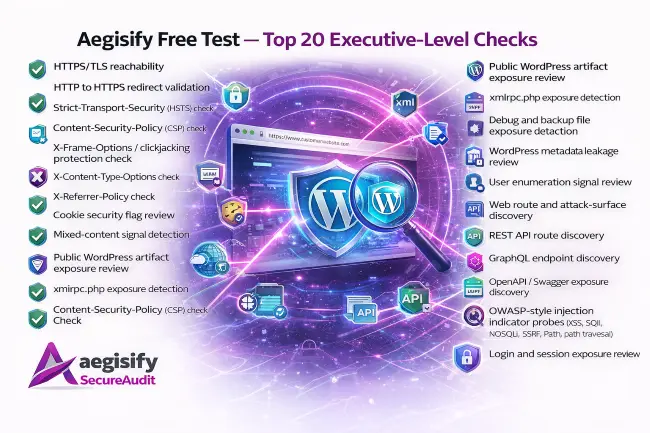
Aegisify’s Free Scan Test gives security leaders a fast, external view of website risk across transport security, public exposure, attack-surface discovery, API visibility, and lightweight OWASP-aligned attack indicators.

Quick Questions & Answers
Step 1: 1) Download Agent 2) Login to your WordPress Admin -> Plugins -> Add Plugins -> Upload Plugin -> select the download, install and Activate 3) Once installed, it’ll run a local scan.
Step 2: Add Domain below -> Create a txt DNS record with the details below -> click Verify Record
Step 3: Click to expand “Agent Details” below, copy the generated Encryption / Security Key
Step 4: Go back to WordPress Admin -> Open “Aegisify Audit Agent” from the left menu Open the Agent -> Paste the Encryption / Security Key
Step 5: Go to “Agent Details” below and click on “Connect Over SSL” and view the connectivity logs. It should say Success -> Agent Verified Succeeded.
Within 5 days, if you’re not completely satisfied, please send an email to support@aegisify.com requesting a refund and we will refund your entire amount.
The defensive static scan through the agent is a SaaS-orchestrated internal WordPress assessment that calls signed HTTPS agent endpoints for quick inventory, deeper inventory, correlation, and on the deep profile permissions review. The agent returns structured internal results, and the SaaS merges those into defensive findings covering software inventory, vulnerability matching, integrity drift, privileged account review, hardening posture, backup/recovery readiness, and authenticated assurance.
The Dynamic SaaS-orchestrated DAST-style flow works in stages:
- Builds a profile-driven offensive plan
- Performs public exposure and hardening discovery
- Discovers web routes, forms, parameters, scripts, APIs, and optional auth contexts
- Optionally pulls agent inventory/correlation
- Runs safe active HTTP probes against discovered pages, parameters, forms, and API endpoints
- For advanced profiles, runs an advanced offensive suite
- Correlates, scores, and snapshots the findings
What “dynamic” means in this build
In this plugin, “dynamic offensive scan” means:
- it makes live HTTP requests to the target
- it inspects real responses
- it builds findings from observed behavior
- it uses safe canary probes, not destructive exploitation
- it can include optional browser-assisted inventory
for Deep Auth, it can include credentialed/session-backed replay
So this is not just a static checklist. It is active external testing against the running application.
The Advanced Scan builds on the standard offensive scan by adding deeper profile-based analysis. After the normal live discovery and safe active testing stages run, Aegisify Audit applies advanced logic based on the selected profile—credentialed auth mapping, API-focused route enrichment, or browser/client-side depth. This creates a more detailed attack-surface model, stronger correlation, and richer findings for higher-risk targets.
