
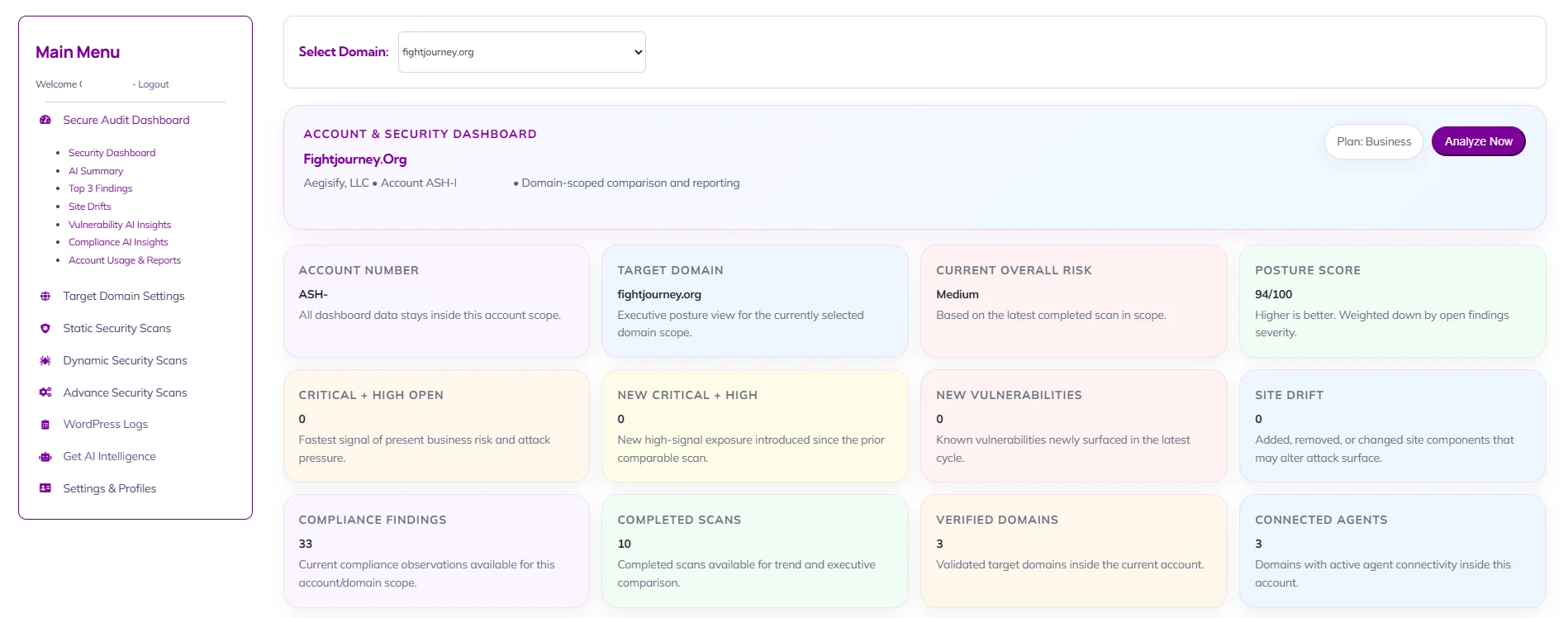
The Main Menu is the primary navigation framework for the Aegisify Audit workspace. It gives the user structured access to executive dashboards, scan operations, domain administration, WordPress log ingestion, AI-assisted intelligence, and account configuration, ensuring that both operational workflows and governance tasks can be reached from a single control surface.
Select Domain
The Select Domain card sets the active scope for the dashboard and all related executive reporting. It ensures that metrics, AI summaries, findings, and account posture indicators are shown in the context of the selected verified asset rather than across unrelated targets.
Account & Security Dashboard
The Select Domain card sets the active scope for the dashboard and all related executive reporting. It ensures that metrics, AI summaries, findings, and account posture indicators are shown in the context of the selected verified asset rather than across unrelated targets.
Plan
The Plan indicator confirms the subscription tier governing feature access, reporting depth, and scan availability. It helps the user understand whether the current experience reflects the licensed operating model.
Analyze Now
The Analyze Now action refreshes the dashboard narrative and comparative reporting for the selected scope. It is the primary control used when the user wants the latest scan-derived interpretation surfaced immediately utilizing Artificial Intelligence.
Account Number
This card identifies the tenant boundary under which all dashboard data is being presented. It is important for governance and multi-tenant clarity because it confirms that metrics, findings, and reports are constrained to the correct organizational account.
Target Domain
This card confirms the active asset scope for the current executive view. It makes clear which domain the current posture, findings, and comparative insights are tied to, reducing ambiguity when multiple targets exist under the same account.
Current Overall Risk
This card presents the current risk state of the selected domain in a simplified executive form. It is intended to summarize the overall level of concern based on the latest completed scan results without requiring the user to interpret raw findings first.
Posture Score
This card provides a weighted security posture score for the selected scope. It offers an at-a-glance indicator of relative strength or deterioration, helping leaders and engineers gauge whether the environment is improving, stable, or regressing over time.
Critical + High Open
This card isolates the highest-priority open issues currently affecting the selected scope. It is designed to surface the clearest signal of present business and technical risk requiring immediate attention.
New Critical + High
This card shows whether new top-severity issues have been introduced since the prior comparable scan. It is intended to help teams distinguish between existing known risk and newly emerging exposure.
New Vulnerabilities
This card highlights newly surfaced known vulnerabilities in the latest scan cycle. It is particularly useful for understanding whether recent changes, component updates, or missed coverage have introduced fresh software risk.
Site Drift
This card summarizes whether the observed site composition has changed between scans. It is a concise indicator of environmental movement that may explain new findings, altered posture, or changed attack surface.
Compliance Findings
This card reports the count of current compliance-related observations within the selected scope. It is intended to quantify control and baseline deviation in a way that is immediately useful for governance and remediation planning.
Completed Scans
This card indicates how many completed scans are available for comparison and reporting. It helps the user understand the depth of available history and whether the environment has enough prior state for meaningful trend analysis.
Verified Domains
This card shows how many domains have been ownership-validated within the account. It supports both governance and operational readiness by confirming how many assets are formally approved for managed assessment.
Connected Agents
This card shows how many verified domains currently have active agent connectivity. It is a readiness indicator for deeper defensive and log-based capabilities that depend on live integration with the target environment.