Does a 1GB wp_posts Table Slow Down WordPress?
Yes, it can.
When your WordPress wp_posts table grows toward 1GB:
- Queries take longer to scan and sort.
- Index lookups become heavier.
- Backup operations take more time and server resources.
- Hosting memory and CPU usage increase.
- Page load performance can degrade.
For bloggers publishing daily, marketing teams running campaigns, or shop owners managing thousands of product updates, large database tables directly affect operational efficiency.
Executives and decision-makers should understand that database bloat isn’t just technical clutter, it’s operational risk. A slow site affects SEO rankings, ad performance, customer trust, and revenue.
Why This Happens (Even on Small Sites)
WordPress is designed to preserve content safely. That means it stores:
- Post revisions
- Autosaves
- Scheduled drafts
- Deleted content in trash
- Plugin metadata entries
Additionally, plugins can add substantial metadata bloat. When those plugins are removed, their data sometimes remains.
Over time, this leads to:
-
Excessive revisions inflating wp_posts
-
Orphaned entries inflating wp_postmeta
-
Tables requiring optimization to reclaim space
This growth often goes unnoticed until hosting alerts trigger or backups become sluggish.
How Aegisify Backup Solves the Problem
Aegisify Backup is more than just a FREE WordPress Backup tool, it’s a professional database management and Disaster Recovery solution.
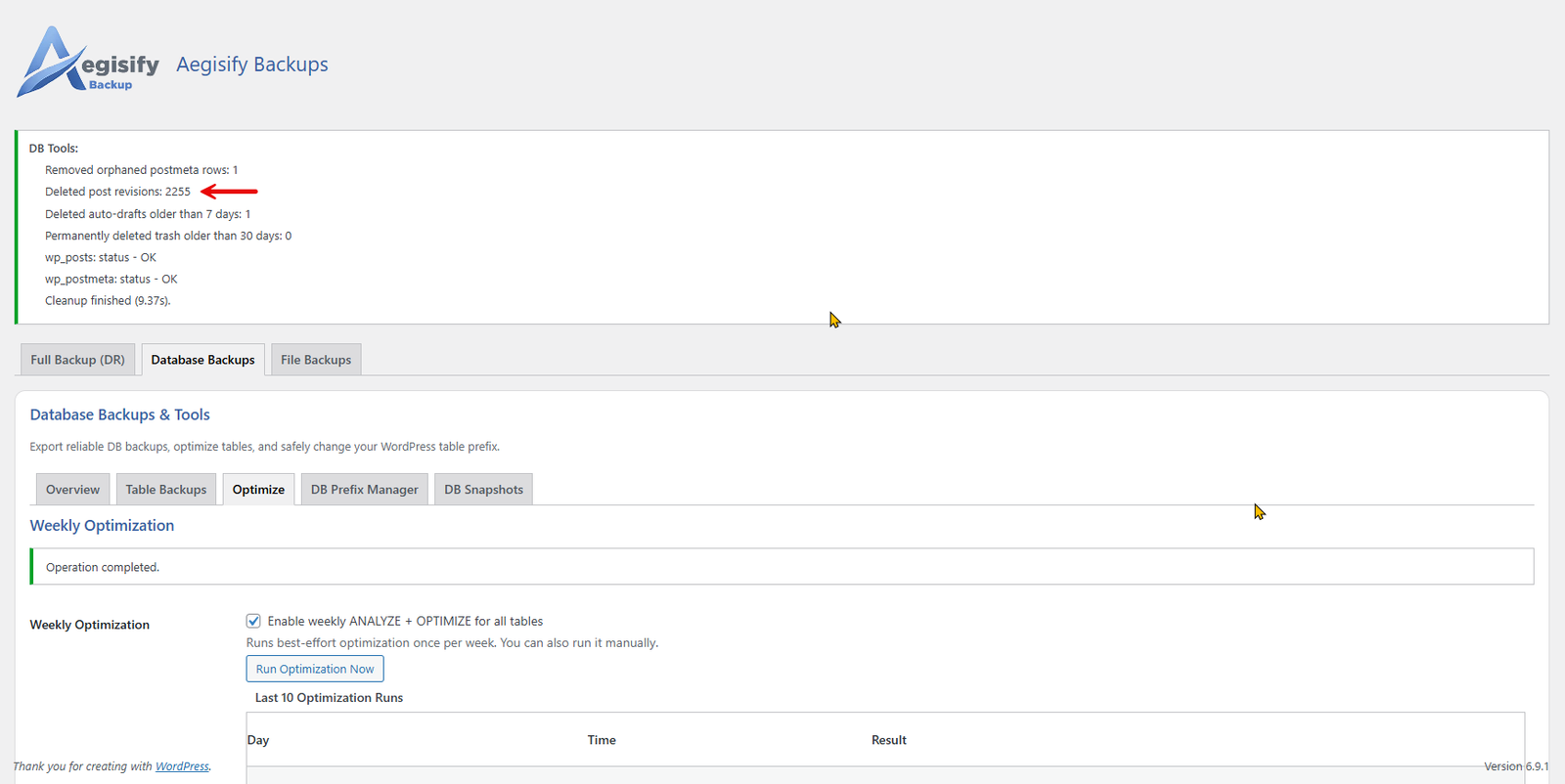
Inside Backups → Database Backups → Optimize, Aegisify Backup now includes safe cleanup tools designed specifically for WordPress best practices.
It performs:
- Removal of orphaned postmeta (meta rows not tied to any existing post)
- Safe deletion of old revisions using WordPress APIs
- Cleanup of stale auto-drafts and trash entries
- Optional optimization of
wp_posts and wp_postmeta tables
Most importantly, it does this safely without breaking pages, images, linking structures, or post integrity.
Unlike direct SQL hacks or risky scripts found online, Aegisify Backup uses WordPress core functions and proper security practices including nonces, sanitization, capability checks, and structured database access through $wpdb.
Individual Table Cleanup: Why It Matters
A key advantage of Aegisify Backup is that it cleans the wp_posts and wp_postmeta tables individually and intentionally.
wp_posts Cleanup
Revisions, auto-drafts, and unnecessary historical records are safely removed. Your published posts and pages remain intact. Attachments and media remain untouched.
wp_postmeta Cleanup
Orphaned metadata entries, those that reference posts that no longer exist are removed. This alone can reclaim massive database size reductions.
Table Optimization
After cleanup, tables can be optimized to physically reclaim disk space and improve query performance.
This layered approach ensures the database is not only cleaned but structurally optimized.
Why Bloggers, Businesses & Shop Owners Need This
Content-driven businesses are the most vulnerable to database growth:
- Bloggers publish frequently.
- Marketing teams revise content often.
- eCommerce stores update product listings constantly.
- Agencies manage multiple content editors.
Every revision is saved. Every plugin interaction may add metadata.
Without periodic database optimization, performance declines gradually often unnoticed until it impacts SEO rankings, conversion rates, or hosting costs.
A clean database means:
- Faster page loads
- Faster admin dashboard response
- More efficient backups
- Lower server resource usage
- Improved scalability
Aegisify Backup: The #1 FREE WordPress Backup & Disaster Recovery Solution
What sets Aegisify Backup apart is that all core features are FREE:
- FREE full file backups
- FREE database table backups
- FREE File backups
- FREE migration between hosting providers
- FREE restore capabilities
There are no hidden barriers to protecting your WordPress investment.
Executives appreciate risk mitigation. Administrators appreciate reliability. Bloggers appreciate simplicity. Shop owners appreciate performance.
Aegisify Backup delivers all of it at zero cost.
Why Disaster Recovery Still Matters
Even if your WordPress database grows unexpectedly, even if your wp_posts table hits hundreds of megabytes, you remain protected.
With Aegisify Backup:
- You can generate Disaster Recovery links.
- You can move WordPress from one hosting provider to another FREE.
- You can restore database tables individually.
- You can rebuild your environment quickly.
Database optimization and Disaster Recovery go hand-in-hand. Clean data improves performance; backups protect continuity.
The Executive Takeaway
A bloated WordPress database is not just a technical inconvenience, it’s a business liability.
If your wp_posts table has grown by 1000%, your WordPress performance, backup speed, and scalability are at risk. Ignoring database size growth eventually impacts revenue, SEO, and operational stability.
Aegisify Backup provides:
- A safe way to optimize WordPress database tables
- A FREE, #1 Backup solution
- FREE Disaster Recovery and migration
- Performance-conscious database cleanup
For WordPress owners, administrators, and executives, the message is simple:
Protect your data. Optimize your database. Reduce your size. Secure your Disaster Recovery plan.
And do it with Aegisify Backup, the #1 FREE WordPress Backup solution built for performance, protection, and growth.