
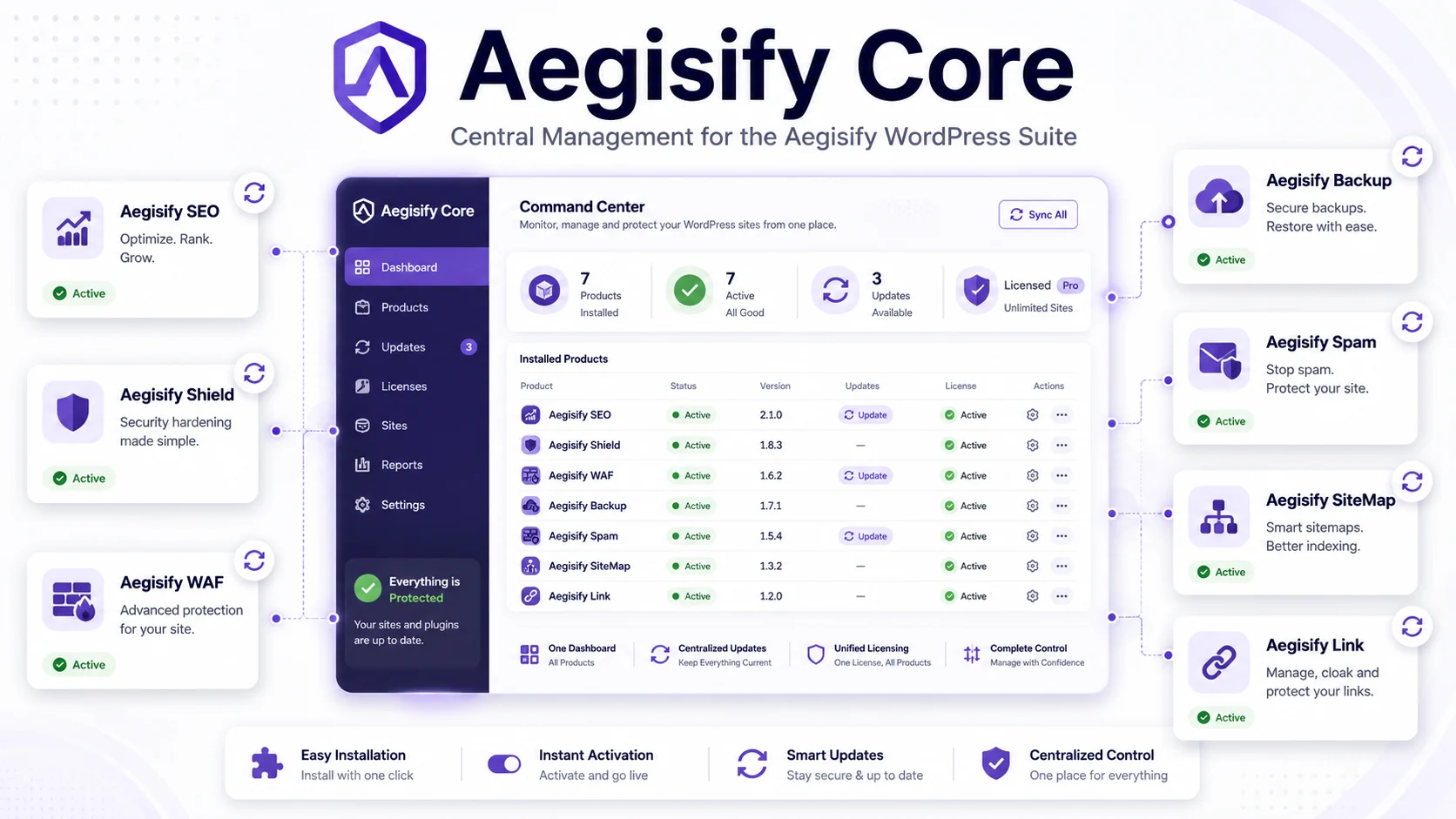
Central Management for the Aegisify WordPress Suite
Aegisify Core is the central control plane for managing the Aegisify WordPress product suite from one administrative workspace. It helps site owners and technical teams install, activate, deactivate, license, and update supported Aegisify products while providing clear visibility into product status, installed versions, available updates, subscription entitlement, and shared suite settings. Rather than replacing the individual security, SEO, backup, WAF, spam, sitemap, or link products, Aegisify Core simplifies how they are deployed, maintained, and governed across a WordPress website.
Try any of the products below fully featured for 30 days free
Aegisify Product Guide
Aegisify Core Product Guide and Administrator Documentation
Version 1.1.16
Updated July 16, 2026
Applies to: Aegisify Core 1.1.16 for WordPress 6.8 or later and PHP 8.2 or later
Aegisify Core is the control plane for the Aegisify WordPress product suite. It provides one administrative entry point for reviewing suite status, installing supported Aegisify products, activating or deactivating them, checking for updates, applying approved updates, and managing the license associated with the site’s Aegisify subscription.
Table of Contents
- About This Guide
- What Aegisify Core Is
- What Aegisify Core Does Not Do
- Version 1.1.16 Overview
- Product Operating Model
- Requirements and Pre-Installation Checklist
- Current Administration Navigation
- Installing Aegisify Core
- Aegisify Dashboard
- Suite License and Subscription Management
- Activating a License
- Deactivating a License
- Trial and Free Registration Options
- Aegisify Plugins Management
- Managed Product Catalog
- Installing an Aegisify Product
- Activating and Deactivating Products
- Manual Update Checks
- Nightly Update Checks
- Applying Product Updates
- Understanding Product Status and Versions
- Suite Menu Shortcuts and Module Controls
- Shared SMTP Settings
- Dashboard News and External Resources
- Data Handling and Privacy
- Permissions and Security Controls
- Operational Runbooks
- Verification and Quality Assurance
- Troubleshooting
- Frequently Asked Questions
- Glossary
- Release Summary and Documentation Notes
- Official Aegisify References
About This Guide
This guide is the administrator and product-operations reference for Aegisify Core 1.1.16. It is written for:
- WordPress site owners and administrators.
- Agencies managing Aegisify products across client sites.
- Technical teams responsible for plugin installation, activation, and updates.
- Subscription owners responsible for Aegisify licensing.
- Security-conscious organizations that need controlled administrative changes and clear product status.
What this guide covers
This guide explains:
- The role of Aegisify Core inside the Aegisify product suite.
- How to install and activate Aegisify Core.
- How the Core dashboard presents subscription and suite information.
- How to install, activate, deactivate, and update supported Aegisify products.
- How manual and scheduled update checks operate.
- How suite licensing, trials, and optional free registration work.
- How shared SMTP and dashboard-news functions fit into Core.
- What data can be transmitted to Aegisify services.
- How to validate the installation and troubleshoot common failures.
Important limitation
Aegisify Core is not the security scanner, WAF, SEO engine, backup system, spam filter, sitemap engine, or internal-linking engine. Those capabilities live in their respective Aegisify plugins.
Core coordinates the suite. It does not replace the individual product guides or the operational testing required for each installed product.
Documentation status
This guide was rebuilt from the Aegisify Core 1.1.16 plugin package. It is customer-facing draft documentation. Interface labels, available products, subscription entitlements, and service endpoints can change in later builds.
What Aegisify Core Is
Aegisify Core is the administrative foundation for the Aegisify WordPress ecosystem.
It provides:
- A single Aegisify menu in WordPress administration.
- A central suite dashboard.
- A product-management page for supported Aegisify plugins.
- Current installed-version and latest-known-version visibility.
- Product installation, activation, deactivation, and update actions.
- Manual update checks.
- A nightly update-metadata check.
- A shared suite-license interface.
- Optional shared SMTP configuration.
- Suite shortcuts and product navigation support.
- An Aegisify news and updates widget on the WordPress Dashboard.
Primary job to be done
Without a central control plane, administrators must install each suite plugin separately, remember which products are active, track versions across several screens, and repeat license configuration.
Aegisify Core reduces that administrative fragmentation by giving the site owner one place to review and manage the supported suite.
What Aegisify Core Does Not Do
Aegisify Core does not independently perform the specialized work of the suite products.
| Capability | Product responsible |
|---|---|
| WordPress hardening and monitoring | Aegisify Shield |
| Web application firewall and request controls | Aegisify WAF |
| SEO operations and search visibility | Aegisify SEO |
| Backup, disaster recovery, and migration | Aegisify Backup |
| Spam scoring and submission protection | Aegisify Spam |
| Internal and managed link operations | Aegisify Link |
| Sitemap and crawler-policy management | Aegisify SiteMap |
| Suite installation, updates, licensing, and shared administration | Aegisify Core |
Core can install or manage a product, but the installed product owns its own configuration, data, logs, scans, and operational behavior.
Version 1.1.16 Overview
The reviewed 1.1.16 package includes the following important operating behavior.
Central plugin-management cards
Each managed product card can show:
- Whether the product is available or installed.
- The currently installed version.
- The latest version known to Core.
- Whether the product is active.
- An appropriate install, activate, deactivate, or update action.
Manual Check Updates action
Administrators can request a fresh update-metadata check from the Aegisify Plugins page.
Nightly update checks
Core schedules a metadata check for local midnight in the WordPress site timezone. The job runs whether or not a paid license is active.
The scheduled task checks for update information. It does not silently install product updates.
License status durability
Core keeps a short-lived license-status cache and a durable last-known status record. This reduces false inactive displays when a transient cache expires or a temporary remote refresh fails.
Domain and credential validation
License checks use the configured site domain, license key, and license email. A domain mismatch or email/license mismatch can prevent Pro status from being accepted.
Shared license-change event
When the suite license status changes, Core publishes an internal WordPress event so other Aegisify products can clear stale license caches.
Optional SMTP administration
Core includes a shared SMTP screen that can route WordPress mail through an available Aegisify SMTP service or through manually configured SMTP credentials.
Product Operating Model
Aegisify Core follows a controlled suite-management loop:
- Install Core. Establish the suite control plane.
- Activate the subscription license. Connect the site to its Aegisify entitlement.
- Review the product catalog. Identify which products are installed, active, or available.
- Install required products. Use WordPress’s plugin upgrader and filesystem controls.
- Activate products deliberately. Confirm each product’s own setup requirements.
- Check updates. Refresh the latest-known version information.
- Apply approved updates. Update products individually after backup and change review.
- Validate the result. Confirm versions, activation state, and product functionality.
- Monitor nightly checks. Investigate stale or missing update information.
- Maintain the license. Review plan, expiration, domain, and status.
Core product areas
| Area | Purpose |
|---|---|
| Dashboard | Suite overview, license status, subscription links, and product shortcuts |
| Plugins | Install, activate, deactivate, check, and update supported products |
| License | Store the license key and checkout email; activate, deactivate, or review status |
| Update metadata | Compare installed versions with Aegisify’s latest-known versions |
| Nightly scheduling | Refresh update information around local midnight |
| Shared SMTP | Configure WordPress email delivery through a shared suite screen |
| Navigation | Provide one Aegisify menu and shortcuts into enabled product areas |
| News widget | Surface recent Aegisify news, documentation, and support links |
Requirements and Pre-Installation Checklist
Technical requirements
- WordPress 6.8 or later.
- PHP 8.2 or later.
- WordPress administrator access.
- Permission to install, activate, deactivate, and update plugins.
- Outbound HTTPS access to Aegisify endpoints.
- A working WordPress cron system or server cron.
- Sufficient filesystem permissions for plugin installation and updates.
- A current backup before making suite-wide changes.
Before installing
- Create a current database and file backup.
- Confirm the site is not a staging clone using a production-bound license without approval.
- Record currently installed Aegisify products and versions.
- Confirm WordPress can install a normal plugin through the Plugins screen.
- Confirm outbound connections to
aegisify.comare not blocked. - Identify the license key and the email used at checkout.
- Review the site timezone because the nightly check targets local midnight.
- Schedule updates outside high-traffic or revenue-critical windows.
- Confirm the administrator understands which individual Aegisify products are needed.
Hosting note
Some hosts require FTP or other filesystem credentials during plugin installation or update. This is WordPress filesystem behavior and does not necessarily indicate an Aegisify error.
Current Administration Navigation
After activation, Aegisify Core creates the main Aegisify menu.
| Menu | Purpose |
|---|---|
| Aegisify → Dashboard | Suite summary, license panel, subscription information, and product links |
| Aegisify → Plugins | Product installation, status, versions, activation, and updates |
| Aegisify → SMTP Settings | Shared WordPress SMTP and email-delivery configuration |
| Aegisify → Product shortcut | Optional jump link to an enabled Aegisify product’s own administration page |
Access requirement
The Core dashboard and suite pages use the WordPress manage_options capability. This normally limits access to Administrators.
Product installation and update actions also require the corresponding WordPress plugin-management capabilities.
Installing Aegisify Core
Standard installation
- Sign in to WordPress as an Administrator.
- Go to Plugins → Add New Plugin → Upload Plugin.
- Select the Aegisify Core ZIP package.
- Choose Install Now.
- Activate Aegisify Core.
- Open Aegisify → Dashboard.
Confirm activation
Verify that:
- The Aegisify menu is visible.
- The Dashboard loads without a PHP error.
- Version 1.1.16 is shown in WordPress’s Plugins screen.
- The Plugins page displays the supported product catalog.
- The license panel is visible.
- The nightly update-check event is scheduled.
- The WordPress Dashboard contains the Aegisify News & Updates widget.
Activation-created integration files
The package creates an internal integrations directory and default JSON placeholders for suite-oriented registry, schema, scan-plan, and snapshot data.
These files are part of Core’s internal structure. They are not customer reports and should not be edited as a routine configuration method.
Aegisify Dashboard
The Dashboard is the suite entry point.
It can include:
- Aegisify branding and suite summary.
- A Get Started link to the Plugins page.
- Documentation and help links.
- A license-status panel.
- Subscription and purchase links.
- Product icons and public product references.
- A free security-scan link.
- Action messages after a successful or failed module request.
Dashboard role
The Dashboard is intended to answer three questions:
- Is this site connected to an active Aegisify license?
- Which suite products are relevant to this site?
- Where should the administrator go next?
The Dashboard is not a combined security or SEO report. Product findings remain inside the individual Aegisify products.
Suite License and Subscription Management
Aegisify Core is the primary license interface for the WordPress suite.
The license panel can display:
- Status.
- Plan.
- Expiration date.
- Whether Pro entitlement is active.
- License key.
- License email.
- Activation and deactivation actions.
- Trial action.
- Optional free-install registration status.
Single subscription model
Core stores one suite license key and one associated email for the site. Other Aegisify products can use Core’s verified status to determine whether subscription-defined features and updates are available.
The exact products, site limits, and feature entitlements depend on the active Aegisify subscription and the response from the Aegisify license service. Core does not independently define a customer’s commercial plan.
Status refresh behavior
Core:
- Keeps a six-hour transient status cache.
- Preserves a durable last-known verified status.
- Treats a status refresh as due after approximately four hours.
- Performs a daily license check through its regular boot process.
- Can preserve the last active status when a non-authoritative refresh temporarily fails.
- Marks an expired license inactive when the stored expiration date has passed.
Activating a License
Required information
- Aegisify license key.
- Email address used for the subscription or checkout.
Activation procedure
- Open Aegisify → Dashboard.
- Locate the license panel.
- Enter the license key.
- Enter the license email.
- Select Activate License.
- Review the displayed status, plan, and expiration.
- Open the Plugins page and confirm subscription-managed update information is available.
Validation performed
The reviewed workflow sends the license key, license email, site URL, domain, Core version, WordPress version, PHP version, and plugin identifier to the Aegisify license service.
Activation can fail when:
- The key is empty.
- The email is invalid.
- The key and email do not match.
- The license is inactive or expired.
- The licensed domain does not match the current site.
- The site cannot reach the license endpoint.
- A firewall, proxy, or host blocks the request.
Site migration guidance
Deactivate the license on the old site before activating it on a replacement domain when the subscription requires domain binding.
Do not assume that copying the WordPress database automatically transfers a valid license assignment.
Deactivating a License
Use license deactivation when:
- Retiring the site.
- Moving the license to another approved domain.
- Rebuilding or replacing the WordPress installation.
- Troubleshooting a domain-binding issue.
- Following an approved subscription-management process.
Procedure
- Create a record of the current status and installed products.
- Open the Core license panel.
- Select Deactivate.
- Confirm the status changes to inactive.
- Verify that subscription-controlled product features respond as expected.
- Complete any license move through the Aegisify account or support process.
Deactivating the license does not uninstall the individual plugins or delete their data. It changes entitlement status.
Trial and Free Registration Options
Trial
The Core interface includes a Start 30-Day Trial action.
The request can include:
- Site domain.
- Site URL.
- License email or WordPress administrator email.
- Current administrator ID, login, display name, and email.
- WordPress version.
- PHP version.
- Core version.
Trial availability, duration, eligibility, and resulting entitlement are controlled by the Aegisify service. The button label should not be treated as a guarantee that every site is eligible.
Optional free-install registration
A free installation can be registered only after consent.
The registration request includes:
- Product identifier.
- Core version.
- Site domain.
- Site URL.
- WordPress administrator email.
When registration succeeds, the service can return a free license key for local storage.
Consent requirements
Free registration is optional. Administrators should review the data description before opting in.
Unregistering the free installation changes the local opt-in and registration status. It does not automatically delete every historical server-side record; use the applicable privacy or support process for broader deletion requests.
Aegisify Plugins Management
Open Aegisify → Plugins to manage supported Aegisify products.
The page provides:
- Product name and description.
- Product image.
- Installed or available badge.
- Current installed version.
- Latest known version.
- Installed, active, or not-installed status.
- Install action.
- Activate or deactivate action.
- Update action when a newer package is available.
- Manual Check Updates action.
- Links for account registration, purchase, support, bug reporting, and documentation.
Product-management principle
Core coordinates plugin lifecycle actions through WordPress. It does not bypass WordPress filesystem permissions, capability checks, nonces, or the Plugin Upgrader.
Managed Product Catalog
The reviewed 1.1.16 Plugins page contains these catalog entries.
| Product | Core management role |
|---|---|
| Aegisify Core | Displays the installed Core package and its current version |
| Aegisify Shield | Install, activate, deactivate, and update |
| Aegisify WAF | Install, activate, deactivate, and update |
| Aegisify SEO | Install, activate, deactivate, and update |
| Aegisify Backup | Install, activate, deactivate, and update |
| Aegisify Spam | Install, activate, deactivate, and update |
| Aegisify Link | Install, activate, deactivate, and update |
| Aegisify SiteMap | Install, activate, deactivate, and update |
The Dashboard can promote additional Aegisify products and services. A promoted icon does not necessarily mean that the product is included in the managed Plugins-page catalog in the current build.
Catalog entries can also be extended by Aegisify integrations through WordPress filters.
Installing an Aegisify Product
Procedure
- Open Aegisify → Plugins.
- Find a product marked Available or Not Installed.
- Review the product description.
- Select Install Plugin.
- Provide filesystem credentials if WordPress requests them.
- Wait for the success or error notice.
- Confirm the card changes to Installed.
- Activate the product separately.
- Open the product’s own setup guide.
What Core does
Core:
- Validates the configured package URL.
- Uses WordPress’s
Plugin_Upgrader. - Uses WordPress filesystem handling.
- Installs the package into the WordPress plugins directory.
- Returns a success or error message.
What Core does not do
Core does not automatically complete the installed product’s setup wizard, security configuration, scan baseline, SEO settings, backup schedule, or other product-specific configuration.
Installation safety
Before installing a major suite product:
- Back up the site.
- Confirm PHP and WordPress requirements.
- Check for overlapping plugins.
- Review the product guide.
- Test on staging when the site is mission-critical.
Activating and Deactivating Products
Activating a product
- Confirm the product is installed.
- Select Activate Plugin.
- Review the success notice.
- Open the product’s own administration page.
- Complete its setup and validation.
Deactivating a product
- Confirm the business impact.
- Review whether the product controls security, SEO output, backups, redirects, or email.
- Select Deactivate Plugin.
- Confirm the product is inactive.
- Validate the public site and scheduled operations.
Important distinction
- Installed means the product files exist.
- Active means WordPress is loading the product.
- Licensed means the Aegisify entitlement recognizes the site.
- Configured means the product’s own required settings have been completed.
These are separate states.
Manual Update Checks
The Check Updates action refreshes the latest-known version information for the managed catalog.
What the check does
For each installed managed product, Core can send:
- Product identifier.
- Installed version.
- Site URL.
- License key, when stored.
- License email, when stored.
The service can return:
- Whether an update is available.
- Latest version.
- Download URL.
- Changelog URL.
Core records newer metadata in local update history and avoids replacing a newer known version with an older one.
License-independent behavior
The update-metadata check runs even when a paid license is not active.
When no license credentials are stored, Core does not add a license key or license email to the update request. The site URL and product/version information are still part of the request.
What the check does not do
The check does not automatically install updates. It only refreshes metadata and the available actions.
Nightly Update Checks
Aegisify Core schedules the update-metadata check for the next local midnight based on the WordPress site timezone.
After the nightly job runs, Core schedules the next local-midnight event.
Important timing note
WordPress WP-Cron is request-triggered. The job is targeted for midnight, but it can run later when:
- The site receives no traffic.
- WP-Cron is disabled.
- A host blocks loopback or cron requests.
- Another long-running task delays execution.
For predictable timing, configure a server cron to call WordPress cron regularly.
Nightly behavior
The nightly task:
- Checks installed managed products.
- Refreshes latest-known versions.
- Updates local history.
- Records the last update-check time.
- Does not activate products.
- Does not automatically install available updates.
Applying Product Updates
An update action can appear when:
- The product is installed.
- A newer version is known.
- An authorized download URL is available.
- The administrator has permission to update plugins.
Core can also show WordPress’s normal update action when WordPress’s update transient reports an available update.
Recommended update procedure
- Review the current installed version.
- Review the latest known version.
- Read the release notes or changelog when available.
- Create a current backup.
- Test the update on staging when appropriate.
- Open Aegisify → Plugins.
- Select the product’s update action.
- Wait for the success or error notice.
- Confirm the installed version changed.
- Confirm the plugin remains active.
- Test its primary workflows.
- Review logs and site errors.
Update implementation
The Core-managed update uses WordPress’s plugin upgrader and replaces the destination plugin package with the approved downloaded package.
Update limitations
An update can fail because of:
- Invalid or unavailable package URL.
- License or entitlement restrictions.
- Filesystem permissions.
- Insufficient disk space.
- Network or TLS failure.
- Host security restrictions.
- Corrupted ZIP package.
- PHP execution limits.
- Plugin-folder naming differences.
- A product package that does not meet the site’s requirements.
Understanding Product Status and Versions
Each card can display several independent indicators.
| Indicator | Meaning |
|---|---|
| Available | Product is in the Core catalog but is not installed |
| Installed | Product files exist in the WordPress plugins directory |
| Active | WordPress is currently loading the product |
| Current Installed Version | Version read from the installed plugin header |
| Latest Version | Newest version known from Core’s update metadata |
| Update | A newer package is available through the Core update source |
| Update Plugin | WordPress itself reports an update through its normal update transient |
Version comparison protection
Core does not intentionally present an older remote version as newer than an already installed version. When the installed product is ahead of the stored remote record, the installed version is treated as the latest displayed version.
Stale metadata
A blank or old latest-version value can indicate:
- The update check has not run.
- The product is not installed.
- The remote endpoint is unavailable.
- Update history is empty.
- License or service information is incomplete.
- The site is serving stale cached options.
Run Check Updates and review outbound connectivity.
Suite Menu Shortcuts and Module Controls
Core includes a module registry and enable/disable infrastructure.
When a recognized suite module is enabled and its product menu exists, Core can add a shortcut beneath the main Aegisify menu that redirects to the product’s administration area.
Important distinction
A Core module toggle is not the same as WordPress plugin activation.
A product can be:
- Installed but inactive.
- Active but not enabled as a Core module shortcut.
- Enabled as a shortcut but unavailable because its own menu did not load.
- Active but unlicensed for subscription-controlled features.
Use the Plugins page for WordPress activation. Use the product’s own interface for product configuration.
Shared SMTP Settings
Aegisify Core includes an optional SMTP Settings page.
It can:
- Enable SMTP for WordPress email.
- Select Aegisify SMTP when the Core license and relay integration are available.
- Configure a custom or supported SMTP provider.
- Store host, port, encryption, authentication, username, password, From address, From name, and Reply-To address.
- Test the SMTP connection.
- Send a test email.
Supported provider labels in the reviewed interface
- Aegisify SMTP.
- Custom SMTP.
- Amazon SES.
- SendGrid.
- Mailgun.
- Postmark.
- SMTP2GO.
- Other.
Operational warning
Enabling Send all WordPress emails via SMTP can affect password resets, form notifications, ecommerce messages, security alerts, and other WordPress mail.
Test delivery before relying on it for business-critical notifications.
Credential handling
SMTP credentials are stored in WordPress options. Limit administrator access, use provider-scoped credentials, and avoid exposing passwords in screenshots, exports, or support messages.
Dashboard News and External Resources
Aegisify Core adds an Aegisify News & Updates widget to the WordPress Dashboard.
The widget can include:
- Subscription link.
- Aegisify logo.
- Custom suite description.
- Recent posts from the Aegisify RSS feed.
- Blog link.
- Support link.
- Ticket link.
- Core guide or challenge link.
External request behavior
The widget retrieves the Aegisify RSS feed through WordPress’s feed system. If the site blocks outbound requests, the widget can show no recent posts.
The suite Dashboard and Plugins page also include external links to product pages, registration, purchase, help, bug reporting, and other Aegisify resources.
Data Handling and Privacy
Aegisify Core makes outbound requests for licensing, update metadata, optional registration, trial requests, news, and selected shared services.
Update-metadata requests
Can include:
- Product identifier.
- Installed version.
- Site URL.
- Stored license key.
- Stored license email.
License-status requests
Can include:
- Core product identifier and version.
- Domain.
- Site URL.
- License key.
- License email.
- WordPress version.
- PHP version.
- Core plugin basename.
- Trial token and stored expiration context.
Activation and deactivation requests
Can include:
- Domain.
- Site URL.
- Core version.
- License key.
- License email.
Trial requests
Can include:
- Domain and site URL.
- Email.
- Current administrator ID, login, display name, and email.
- WordPress and PHP versions.
- Core version.
Optional free registration
Can include:
- Product identifier.
- Core version.
- Domain.
- Site URL.
- WordPress administrator email.
News and shared services
The Dashboard news widget can retrieve the Aegisify RSS feed. Aegisify SMTP can relay email through the configured suite service when available and licensed.
Administrator responsibility
Before enabling optional registration, trials, Aegisify SMTP, or other connected services:
- Review the organization’s privacy requirements.
- Confirm the site owner is authorized to transmit the data.
- Avoid using production credentials on untrusted staging copies.
- Review Aegisify’s current privacy and service documentation.
- Use support channels for deletion or account questions when needed.
Permissions and Security Controls
The reviewed Core workflows use WordPress capabilities and nonces.
| Action | Typical capability |
|---|---|
| View Core dashboard and suite pages | manage_options |
| Install a plugin | install_plugins |
| Activate or deactivate a plugin | activate_plugins |
| Update a plugin | update_plugins |
| Run update check | manage_options |
| Change license or SMTP settings | Administrator-level access |
Security practices
- Limit Administrator accounts.
- Use multi-factor authentication where available.
- Keep WordPress, PHP, and the suite products supported.
- Back up before plugin lifecycle changes.
- Do not share license keys in public tickets.
- Do not expose SMTP passwords.
- Use staging for high-impact updates.
- Review Core notices rather than repeatedly retrying failed actions.
- Confirm that only trusted administrators can access the suite pages.
Package-source validation
Core validates that configured installation and update sources use HTTP or HTTPS and performs a request check before handing the package to WordPress’s upgrader.
Administrators must still ensure that the configured source is authorized and that the downloaded package is the intended Aegisify release.
Operational Runbooks
Initial deployment
- Back up the site.
- Install and activate Core.
- Review the Dashboard.
- Configure the suite license.
- Run Check Updates.
- Install one required product at a time.
- Activate and configure each product.
- Validate the public site after every major activation.
- Confirm the nightly event is scheduled.
- Document installed products and owners.
Weekly review
- Review license status and expiration.
- Review current and latest product versions.
- Investigate products showing an update.
- Confirm active products are expected.
- Review recent Aegisify news or release notices.
- Confirm critical WordPress emails are delivered.
Monthly review
- Create a full backup.
- Run a manual update check.
- Review all managed product versions.
- Review unused installed products.
- Review Administrator access.
- Review outbound-service requirements.
- Test the SMTP connection when Core manages WordPress mail.
- Confirm server cron or WP-Cron reliability.
- Update the internal suite inventory.
Before a product update
- Read release notes.
- Confirm compatibility requirements.
- Back up files and database.
- Test in staging when practical.
- Define an acceptance checklist.
- Apply one product update at a time.
- Test product-specific functions.
- Keep rollback assets until acceptance is complete.
During a license incident
- Record current status, plan, expiration, domain, and error.
- Confirm the key and email.
- Confirm the site URL and domain.
- Confirm outbound HTTPS access.
- Avoid repeatedly changing the key.
- Run the activation action once.
- Review the WordPress debug log when enabled.
- Contact Aegisify support with sanitized evidence.
Verification and Quality Assurance
Package review summary
The reviewed Aegisify Core 1.1.16 package contained:
- 10 PHP files.
- No PHP syntax errors in the static validation environment.
- A central Dashboard.
- A managed Plugins page.
- A license client.
- Manual and nightly update-check workflows.
- Shared SMTP administration.
- A Dashboard news widget.
- Module and product-navigation infrastructure.
Static syntax validation does not prove that remote services, hosting permissions, every update package, or every WordPress environment will behave correctly.
Post-installation acceptance checklist
- Core version is 1.1.16.
- Aegisify menu appears.
- Dashboard loads.
- Plugins page loads.
- License status displays.
- Manual update check completes.
- Nightly update event is scheduled.
- Product cards show correct installed states.
- Install action works on a test product.
- Activate and deactivate actions work.
- Update action works on staging.
- Product shortcuts open the expected page.
- SMTP is either disabled or fully tested.
- News widget failure does not affect Dashboard use.
- No new PHP errors appear.
Product-specific validation
After Core installs or updates a suite product, follow that product’s own guide. Core validation alone is not enough.
Troubleshooting
The Aegisify menu does not appear
- Confirm Aegisify Core is active.
- Confirm the user is an Administrator.
- Review the PHP error log.
- Confirm WordPress meets the minimum versions.
- Reinstall the package if files are missing.
The Plugins page is blank or returns 0
Version 1.1.16 registers its administrative action handlers during admin_init so plugin-management requests do not depend only on admin_menu.
If the issue continues:
- Confirm the full 1.1.16 package is installed.
- Clear opcode and object caches.
- Review security-plugin blocks.
- Review PHP errors.
Install Plugin fails
- Confirm the user can install plugins.
- Confirm the package source is reachable.
- Confirm WordPress filesystem credentials.
- Confirm disk space.
- Confirm the ZIP is valid.
- Review host restrictions.
- Try a normal WordPress plugin upload to isolate the problem.
Activate Plugin fails
- Review the displayed WordPress error.
- Confirm the product’s PHP and WordPress requirements.
- Review plugin conflicts.
- Review the PHP log.
- Confirm the product folder and main file are complete.
Latest Version is blank
- Run Check Updates.
- Confirm the product is installed.
- Confirm outbound HTTPS access.
- Confirm
aegisify.comis not blocked. - Confirm WordPress options and object cache are working.
- Review license credentials when the update requires entitlement.
Nightly check did not run at midnight
- Confirm the WordPress timezone.
- Confirm WP-Cron is enabled.
- Confirm the site receives traffic.
- Configure server cron for reliable execution.
- Confirm the scheduled hook exists.
- Review long-running cron events.
License shows inactive after activation
- Re-enter the correct license email.
- Confirm the key and email belong together.
- Confirm the current domain is authorized.
- Confirm the subscription is active and not expired.
- Confirm outbound HTTPS access.
- Avoid using a copied production license on staging without approval.
Core shows an older latest version
- Run Check Updates.
- Clear object cache.
- Confirm the remote metadata is current.
- Confirm the installed plugin main-file path matches the catalog.
- Contact support when the service and package disagree.
Update fails after download
- Confirm filesystem permissions.
- Confirm the package is a valid plugin ZIP.
- Confirm disk space.
- Confirm the product directory is not locked.
- Review PHP execution limits.
- Restore from backup if the product becomes incomplete.
SMTP test fails
- Confirm SMTP is enabled.
- Confirm the selected provider.
- Confirm host and port.
- Confirm TLS or SSL choice.
- Confirm username and password.
- Confirm the sender is authorized.
- Confirm firewall egress.
- When using Aegisify SMTP, confirm an active Core license and available relay integration.
Frequently Asked Questions
Is Aegisify Core required for every Aegisify product?
Core is the suite’s central management and licensing foundation. Individual product requirements can vary, but Core is the recommended control plane for coordinated suite installation, updates, and entitlement.
Does Core perform security scans?
No. Use the relevant Aegisify security or audit product.
Does Core automatically install every product?
No. Products are installed individually by an authorized administrator.
Does the nightly check automatically update plugins?
No. It refreshes update metadata. Updates remain an administrator-controlled action.
Do update checks require a paid license?
The metadata check is scheduled regardless of paid-license status. Some package downloads or Pro updates can still require valid entitlement.
What does one suite license mean?
Core stores one license key and email for the site and shares the resulting suite status with compatible Aegisify products. Exact products, features, and site limits depend on the subscription.
Can I deactivate a product without uninstalling it?
Yes. Deactivation stops WordPress from loading the product but leaves its files installed.
Will deactivating the license delete plugin data?
No. It changes entitlement status. Product files and data remain unless separately removed.
Why might WordPress request FTP credentials?
The host’s filesystem configuration can require credentials for plugin installation or update.
Does Core update itself?
Core appears in its own product catalog and can also participate in normal WordPress plugin-update behavior. Use a supported package and maintain a backup before replacing Core.
Can Core manage products not listed in the catalog?
The catalog can be extended by Aegisify integrations through a WordPress filter. Custom extensions should be developed and tested by qualified teams.
Is optional free registration required?
No. It requires consent and is intended for update and license-related features associated with a free installation.
Does the trial send administrator information?
The reviewed trial request can include current administrator account details, domain, site URL, and environment versions. Review the data handling before starting a trial.
Can Core guarantee that every update is compatible?
No. Core manages the update workflow. Compatibility must be validated against the site, host, WordPress version, PHP version, theme, and other plugins.
Glossary
| Term | Meaning |
|---|---|
| Aegisify Core | Central WordPress control plane for the Aegisify suite |
| Suite product | Individual Aegisify plugin managed through Core |
| Catalog | Product list displayed on the Plugins page |
| Installed | Product files exist in WordPress |
| Active | WordPress is loading the plugin |
| Licensed | Aegisify service recognizes an active entitlement |
| Configured | Product setup has been completed |
| CLM | Aegisify license and product-metadata service used by Core |
| Update metadata | Latest version and package information |
| Nightly check | Scheduled update-metadata refresh around local midnight |
| WP-Cron | WordPress request-triggered task scheduler |
| Server cron | Host-level scheduler used for more predictable WordPress cron execution |
| Transient | Temporary WordPress cache value |
| Last-known status | Durable local copy of a previously verified license response |
| Domain binding | License association with a specific site domain |
| Plugin Upgrader | WordPress component used to install and replace plugin packages |
| SMTP | Protocol used to deliver email |
| Nonce | WordPress request token used to reduce unauthorized administrative actions |
| Capability | WordPress permission required for an action |
Release Summary and Documentation Notes
Verified in 1.1.16
- Central Aegisify administration menu.
- Dashboard and license panel.
- Plugins management page.
- Install, activate, deactivate, and update actions.
- Current and latest version display.
- Manual Check Updates action.
- Nightly update-metadata scheduling at local midnight.
- License activation, deactivation, status, trial, and optional free registration.
- Shared license-change event for suite products.
- Shared SMTP configuration and test tools.
- WordPress Dashboard news widget.
- Module shortcuts for recognized enabled products.
Important implementation notes
- Nightly checks do not automatically install updates.
- WP-Cron can delay the midnight job.
- Product installation uses catalog-defined package sources.
- Update metadata can provide a newer package than the original catalog source.
- Subscription scope should be confirmed against the current Aegisify plan, not inferred only from dashboard marketing text.
- The Dashboard can promote products that are not managed in the current Plugins-page catalog.
- The included readme changelog does not fully document the releases between 1.0.6 and 1.1.16.
- The main plugin file contains duplicated activation-time integration-directory setup blocks; this is redundant but did not create a PHP syntax failure in static review.
- Live acceptance testing remains required for remote services, hosting permissions, cron, licensing, and package updates.
Safe product positioning
Recommended description:
Aegisify Core provides one WordPress control plane for installing, activating, updating, and licensing supported Aegisify products. It reduces suite administration without replacing the specialized configuration and validation required by each product.
Avoid describing Core as:
- A security scanner.
- A WAF.
- An SEO engine.
- A backup system.
- Automatic unattended patch management.
- A guarantee that every product is included in every subscription.
- A guarantee that updates will be compatible with every WordPress environment.
Official Aegisify References

How can Aegisify AI help?
Ask about Aegisify or WordPress: errors, plugins, security, SEO, compatibility, troubleshooting, comparisons, or launch a free website scan.