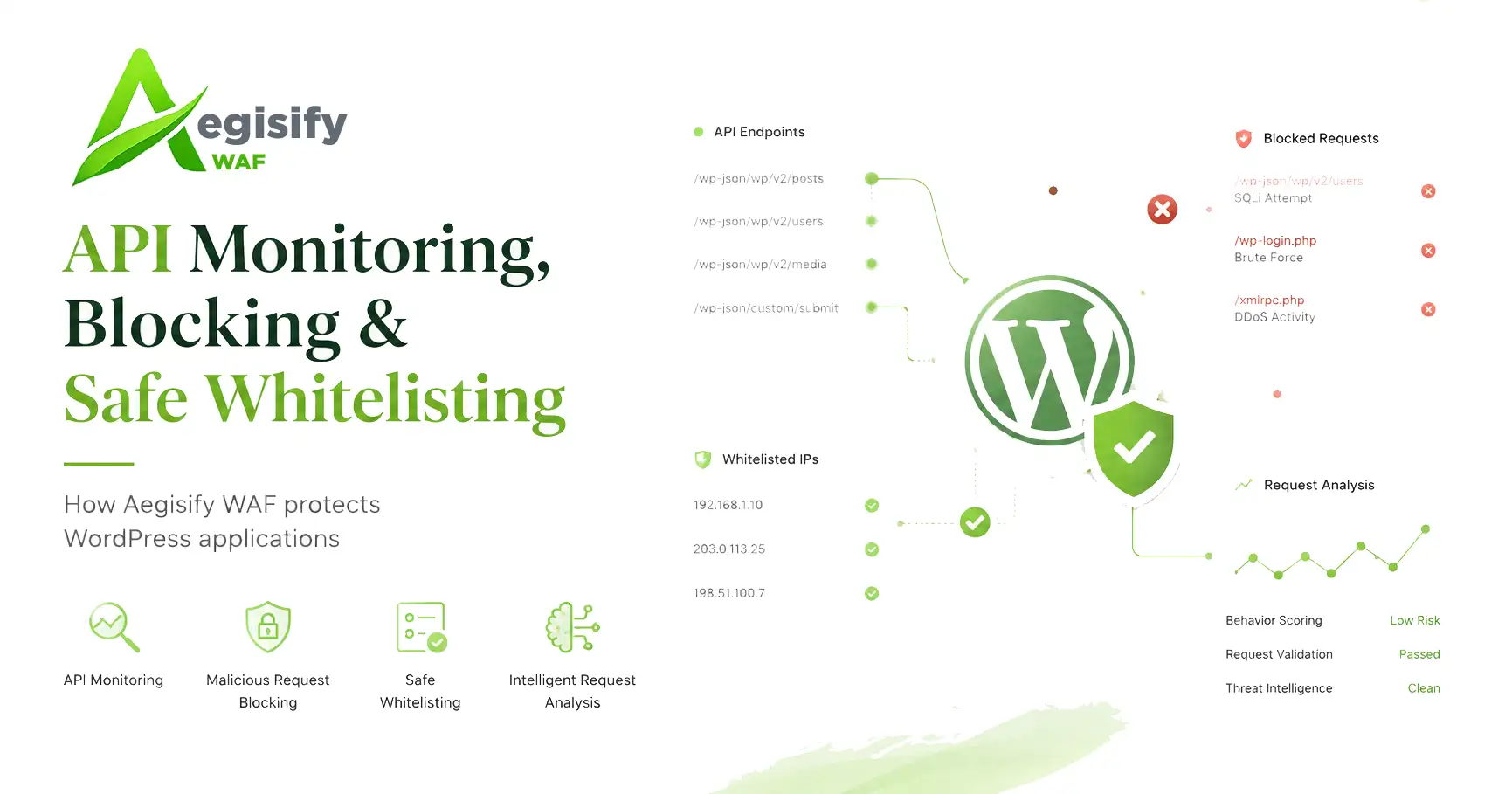
Monitor the Request, Judge the Evidence, and Protect Legitimate Traffic
A WordPress website can operate as a storefront, customer portal, learning platform, membership service, publishing system, or application backend. Plugins and custom code can add public URLs, REST API routes, AJAX actions, webhooks, login workflows, and integrations. That flexibility creates business value, but it also creates more request paths for automated scanners and malicious clients to test.
Effective WAF operations cannot rely on a simple “allow everything” or “block every match” policy. The practical goal is to monitor normal traffic, identify meaningful attack evidence, stop requests that meet a defensible enforcement policy, and create narrow exceptions for verified legitimate services. Aegisify WAF brings those functions together for applications hosted on WordPress.
Observe registered and discovered REST routes, authenticated and public AJAX actions, request methods, activity, policy violations, alerts, and enforcement outcomes.
Separate detections from blocks by combining weighted signals,
independent evidence, route policies, rate behavior, and administrator intent.
Trust only the route, origin, network, integration, or request context that has been verified—without creating an unnecessary global bypass.
How the Monitoring, Blocking, and Whitelisting Workflow Works
- 1
Observe
Identify the request path, method, application surface, REST route, AJAX action, and relevant source or identity context. - 2
Evaluate
Compare the request with managed attack patterns, custom policies,
authentication rules, rate controls, and contextual anomalies. - 3
Score
Weight block-eligible signals, count independent evidence, and keep
lower-confidence heuristics in detection-only status. - 4
Decide
Observe, alert, challenge, rate-limit, temporarily block, or reject
the request according to the enabled policy and route mode. - 5
Tune Trust
Review evidence, release false positives, add narrowly scoped
whitelist entries, or preserve confirmed sources in the block list.
API Monitoring Creates Context Before Enforcement
WordPress REST endpoints and AJAX actions are not isolated technical details. They may process account changes, commerce activity, form submissions, administrative functions, mobile requests, and third-party integrations. WordPress documents REST as an HTTP interface for exchanging JSON data, while authenticated and public AJAX actions are dispatched through distinct action hooks. A WAF therefore needs route and action context—not only a generic URL string.
Aegisify WAF can monitor REST and AJAX activity without enabling blocking by default. Aggregate records can show hits, alerts, blocks, last-seen activity, risk score, evidence count, and the decision reason. More detailed security events are reserved for suspicious behavior. This helps teams review application pressure without turning every routine request into a large forensic record.
API policies can also consider authentication requirements, object-level access, request size, schema expectations, GraphQL behavior, route registration, and rate consumption. These controls matter because current OWASP API guidance continues to emphasize risks such as broken object-level authorization, broken authentication, and unrestricted resource consumption.
The Algorithm: Multiple Signals Are Stronger Than One Pattern Match
One signature match may indicate an attack, but it can also be caused by unusual search text, encoded application data, a developer tool, or a legitimate integration. Modern WAF operations increasingly use anomaly scoring and tuning rather than treating every rule match as an automatic block. OWASP Core Rule Set documentation describes a similar model: detections add points, blocking begins after a configured threshold, and false positives are handled with targeted exclusions.
| Security Signal | Normal Treatment | Why |
|---|---|---|
| One ordinary managed attack signature | Monitor or alert | A single pattern can be ambiguous and may not provide enough independent evidence for a production block. |
| Multiple independent block-eligible signals | Risk-score eligible | Corroborating evidence can reach the configured score and evidence requirements after enforcement is explicitly enabled. |
| Heuristic or contextual anomaly | Detection only | Context is valuable for investigation but should not become an automatic block without stronger supporting evidence. |
| Explicit administrator block policy | Direct policy | A deliberately configured authentication, authorization, custom rule, route, or rate policy may reject a request when enabled. |
monitor first, alert when configured metrics are reached, require stronger evidence for ordinary pattern-based blocking, and keep direct policy decisions visible to the administrator.
Blocking Malicious Requests Without Losing Operational Control
Blocking can occur at several levels. A confirmed request may be rejected immediately by an explicit access policy, temporarily restricted after correlated abusive behavior, rate-limited during excessive request volume, or placed on a permanent deny list by an administrator. Temporary blocks are useful when behavior may stop after a cooldown. Permanent blocks are appropriate only when the source or network has been deliberately reviewed.
The Block List should therefore explain more than “denied.” Administrators need the source, reason, originating control, status, and expiration state. They also need recovery actions: release a temporary block, promote a confirmed source to permanent status, or remove an obsolete permanent entry. This makes enforcement reviewable rather than mysterious.
Blocking at the WordPress/PHP layer does not replace edge protection, secure hosting, software updates, strong authentication, safe code, or tested backups. It is an application-aware control that can stop eligible requests before normal WordPress page handling completes.
Whitelisting Good Requests Should Be Narrow, Verified, and Auditable
A whitelist is not proof that every request from a source is safe. It is a scoped compatibility decision. Aegisify WAF can coordinate trusted routes, front-end paths, origins, IP addresses or CIDR networks, ports, and known plugin or service profiles. The safest entry is the smallest one that solves the legitimate conflict.
Current WAF platforms increasingly describe exceptions as selective “skip” behavior rather than a universal allow action. That distinction matters. A trusted route may need relief from one managed rule while still requiring endpoint authentication, request-integrity checks, rate limits, and other security controls.
Dynamic SaaS integrations deserve extra care. A changing shared-host IP should not automatically become a permanent trusted network. Where possible, trust should be bound to the exact route, method, destination, authentication material, signature, timestamp, or domain relationship that the receiving application will validate. Every whitelist addition should remain removable and visible in an audit trail.
Why This Model Works for WordPress Applications
Teams can learn normal behavior, tune false positives, and enable blocking only when a route or application is ready.
Whitelists can target a specific integration boundary rather than
disabling protection for an entire host or network.
Scores, signals, reasons, counters, alerts, temporary blocks, permanent denies, and administrator actions create an operational record.
The result is a feedback loop: monitor the WordPress application surface, evaluate suspicious traffic, enforce only when policy and evidence justify it, then tune narrow exceptions for verified good traffic. That balance can reduce attack noise while protecting checkout flows, customer access, publishing, APIs, webhooks, and other business-critical WordPress services.
Practical WAF Questions
Does one suspicious request automatically get blocked?
Not necessarily. Monitor and alert modes can record suspicious activity without blocking. Ordinary pattern-based enforcement can require a configured score and independent evidence, while explicit deterministic
policies remain separately controlled.
Should a trusted integration be whitelisted by IP?
Only when the address or network is stable, verified, and appropriately scoped. For changing SaaS infrastructure, authenticated request context is generally safer than permanently trusting a shared or changing IP.
Can a whitelist bypass every security control?
It should not. A narrow exception should address the specific conflict while preserving authentication, request integrity, rate controls, and other protections that still apply.
Technical Source Notes
Reference guidance:
OWASP CRS anomaly scoring,
OWASP CRS false-positive tuning,
OWASP API Security Top 10,
WordPress REST API Handbook,
WordPress AJAX guidance, and
selective WAF skip-rule guidance.