From Manual WordPress Security Settings to a Repeatable Security Posture
WordPress security is rarely weakened by one dramatic mistake. More often, risk grows through accumulated configuration drift: a setting changed during troubleshooting, a new plugin added without review, a scheduled scan disabled, an exposed route overlooked, or a hardening control copied from one site to another without considering the environment.
Aegisify Shield approaches that problem as a configuration-management workflow. The Configuration tab helps administrators preserve a portable security baseline, inventory the current WordPress environment, and use
AI-assisted analysis to draft a safer configuration for human review. The objective is not automatic security by prompt. It is a controlled process for understanding the site, comparing settings, proposing improvements, and keeping a recovery path.
Aegisify Shield turns security settings into managed artifacts. Teams can
back up the current Shield configuration, capture the WordPress
environment, generate a redacted AI-assisted recommendation, validate the
proposed file, and restore it through an administrator-controlled process.
Why Configuration Management Matters for WordPress Security
Official WordPress guidance describes security as continuous work that requires planning, monitoring, updates, and periodic maintenance. NISTsimilarly treats security-focused configuration management as part of the broader process for protecting information systems. The operational lesson is straightforward: a secure setting is more useful when a team can identify it, preserve it, compare it, approve changes to it, and recover it.
This is common in mature security platforms. Network and application security vendors provide ways to export, save, version, and restore appliance configurations. The file format varies by platform, but the underlying pattern is consistent: preserve a known state, review proposed changes, restore deliberately, and avoid rebuilding critical controls from memory during an incident.
WordPress teams need the same discipline, but the environment is more fluid. Plugins, themes, APIs, scheduled tasks, user roles, hosting controls, ecommerce extensions, and application-specific workflows can change the appropriate security posture. A setting that is reasonable for a brochure site may be disruptive for a membership portal or WooCommerce store.
Three Configuration Workflows in Aegisify Shield
Portable Shield Configuration
Create a readable, versioned configuration file that represents the supported Shield settings. The file can be retained, downloaded,
reviewed, edited carefully, and restored through the WordPress
administration interface.
WordPress Environment Inventory
Capture the technical context surrounding the configuration,
including relevant WordPress, plugin, theme, route, scheduling, and security characteristics. This helps distinguish a generic hardening checklist from a site-aware decision.
AI-Assisted Configuration Draft
Select an inventory and a saved Shield configuration, remove
sensitive context, and ask the configured AI service to propose only permitted changes. Shield validates the result and produces a new file for administrator review.
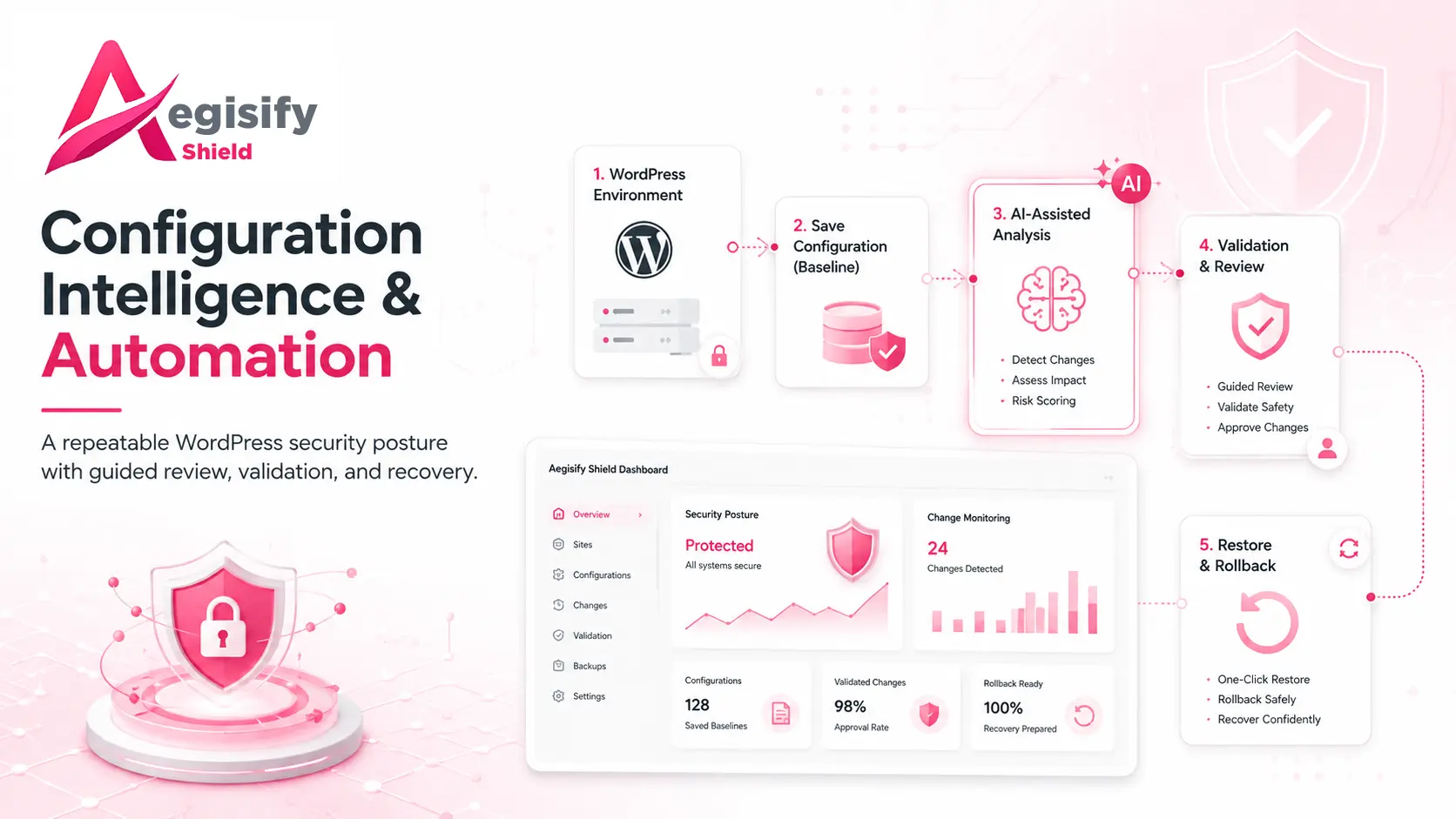
Visual Workflow: How Configuration Automation Works
Core, plugins, themes, routes, schedules, exposures, and current
Shield settings
Portable configuration plus a current environment inventory
Sensitive data removed, change scope limited, output treated as
untrusted
Validated draft, administrator approval, backup, restore, and
rollback path
How the Workflow Operates
| Create a Baseline | Shield collects the supported security settings into a structured portable file. Runtime evidence such as prior scan findings, activity histories, caches, and timestamps remains local because those records describe a site’s past, not the configuration that should be restored elsewhere. |
|---|---|
| Inventory the Site | The inventory captures enough technical context to explain what the WordPress installation is running and where security controls may need to account for applications, routes, schedules, plugins, themes, and operational dependencies. |
| Minimize AI Data | Before analysis, the workflow removes credentials, account details, personal information, internal paths, recipient identities, custom endpoints, and other unnecessary data. The AI service receives only the technical context required for the configuration task. |
| Limit the Change Scope | AI can recommend only a defined group of reversible settings. High-impact controls, credentials, compliance scope, custom paths, and other sensitive decisions remain outside automated changes and require direct administrator judgment. |
| Validate the Output | AI output is not trusted simply because it is formatted correctly. Shield checks the structure, supported keys, permitted values, immutable fields, and configuration completeness before creating a downloadable draft. |
| Review, Restore, and Recover | The proposed configuration does not become live automatically. An administrator reviews the file and uses the normal restore workflow. A recovery record and rollback path help reduce the risk of an incorrect or incompatible change. |
Why This Approach Works Better Than a Generic Security Checklist
It creates repeatability.
Agencies and internal teams can preserve a known security baseline rather than rebuilding settings manually after migration, troubleshooting, or staff turnover. A structured file also makes changes easier to review than a collection of screenshots.
It adds environment context.
WordPress sites differ. Inventory data helps the recommendation process consider whether the site depends on APIs, scheduled jobs, ecommerce, custom applications, page builders, or other integrations that can be affected by hardening.
It separates configuration from evidence.
Previous scan results and operational histories are important, but they should not be copied into a new site as if they were settings. Keeping runtime evidence local reduces confusion and preserves the integrity of each site’s security record.
It uses AI as an analyst, not an administrator.
Current AI-security guidance emphasizes output validation, defined action boundaries, and human oversight. Aegisify Shield follows that safer pattern by generating a reviewable proposal rather than allowing an AI response to write directly into production.
It preserves operational control.
The administrator remains responsible for approval, staging, restore, testing, and rollback. That is especially important for sites where a security change can affect checkout, login, publishing, integrations, or customer access.
Where Configuration Intelligence Can Help Most
Agencies and Multi-Site Teams
Establish a consistent starting point across client sites while
retaining the ability to account for different plugins, hosting environments, application routes, and business requirements.
WooCommerce and Revenue Sites
Review hardening changes with greater context before they affect
checkout, customer accounts, payment integrations, webhooks, or scheduled commerce processes.
Mission-Critical WordPress
Maintain a clearer record of the intended security posture, preserve recovery options, and reduce dependence on undocumented manual settings during incidents, migrations, or platform changes.
Configuration Automation Questions
Does AI automatically secure the WordPress site?
No. AI assists with analysis and drafts a limited configuration
proposal. Shield validates the output, and an authorized
administrator must review and restore the file. Security still
depends on the site, hosting, software condition, operational
practices, and ongoing monitoring.
Can the configuration file replace a full WordPress backup?
No. The portable Shield configuration preserves supported security
settings. It does not replace complete file, database, media,
application, or disaster-recovery backups.
Why keep both an inventory and a configuration?
The configuration describes the intended controls. The inventory
describes the environment those controls must protect. Together they
provide better context than either artifact alone.
Source Notes
Configuration-management context:
NIST SP 800-128;
WordPress security guidance;
OWASP AI output validation guidance.